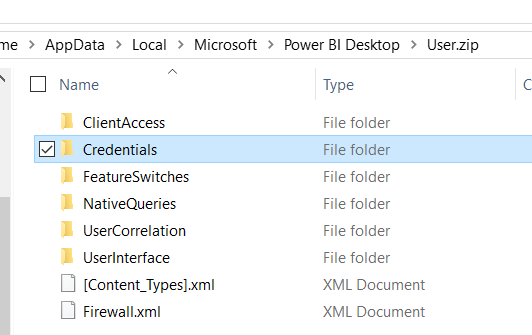
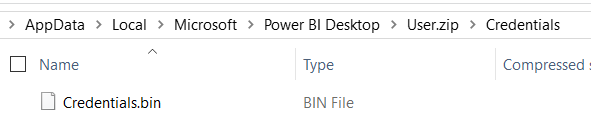
I was working on a demo for my upcoming Pluralsight
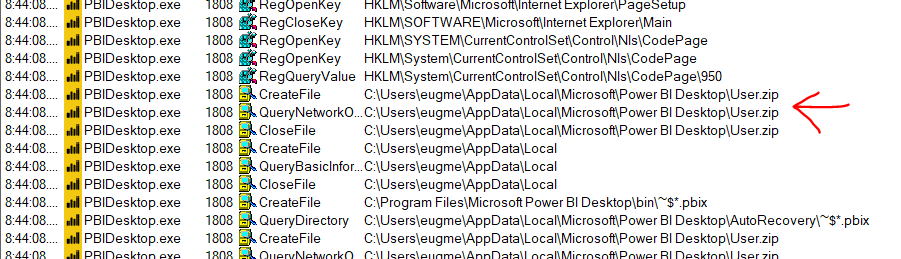
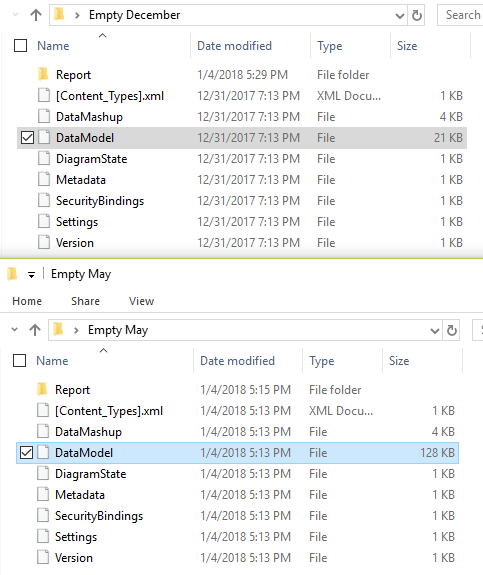
It used to be that you could look at the data model and see a version number.
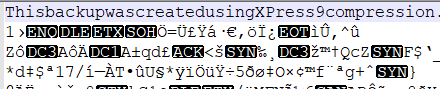
But now, it’s almost entirely unintelligible. The only thing you can read is “This backup was created using xpress 9 compression.”
A little
When imported into power bi Desktop, the new compression model is dramatically more efficient. 184 KB versus 2,288 KB.
What I haven’t figured out yet is if this impacts in-memory use or just when it’s saved to disk. Still it’s nice to see Microsoft continuing to make improvements.
Last year I got to do a Precon on Power BI for the Pittsburgh SQL Saturday. This year I’m honored to be presenting at Cleveland and Cincinnati. This time I thought it would make sense to have a blog post summarizing what’s covered.
One of the things that I found frustrating when I first learned about Power BI, was all of the behind the scenes stuff. It was easy to find information about charts and graphs, but less so about how everything fits together. This precon focuses on two main areas: data wrangling, and administration.
Session 1: Database Theory
Because Power BI is aimed at business users in large part, there are many people using it who don’t have a traditional data background. This means it’s worth touching on some of the fundamentals such as primary keys, normalization and star schema.
The most important things to understand when modeling for Power BI, is that it’s optimized for star schema in particular and filtering/aggregating in general. That fact that it’s a columnar database means it can handle a certain amount of flattening/denormalizing gracefully, because it has really good compression.
Session 2: Power Query
One of the things that can be confusing is that it has 2 different data manipulation languages, M and DAX. (3 languages if you could R!). So a question that comes up a lot is when to use which language.
Power Query is designed for business users primarily, especially since it started as an Excel add-in. In fact the official Microsoft litmus test is that is was designed for users who get value from the excel formula bar in their work. As a result, it has a strong GUI component, but is really basic in a lot of ways.
The way I like to think of it is “Anything you could pay someone minimum wage to do in Excel, you can automate in Power Query.” Power query is all about basic clean up and data prep. You aren’t going to be adding a lot of meaning to the data.
Session 3: DAX
DAX is the language you are going to use to model your data and add meaning to it. DAX is deceptively simple, looking very similar to Excel formulas. In reality, the learning curve on DAX can be quite painful, because it requires thinking in terms of columns and filters, not in terms of rows.
Session 4: Data Gateways
Data gateways are the way that you bridge the cloud Power BI service to whatever data lives on premises. Installation and configuration is pretty simple overall. Data Gateways allow for schedule refreshes of your data up to the cloud.
One thing that’s worth knowing are the alternative query methods available it gateways. By using DirectQuery or live connections, you can query live data without having to export it all to the cloud.
With power BI, generally you are going to be buying pro licenses for all of your users, at $10 per month. However there are other licensing scenarios such as Power BI Reporting server and Power BI Premium. But you are probably going to be going with the pro license.
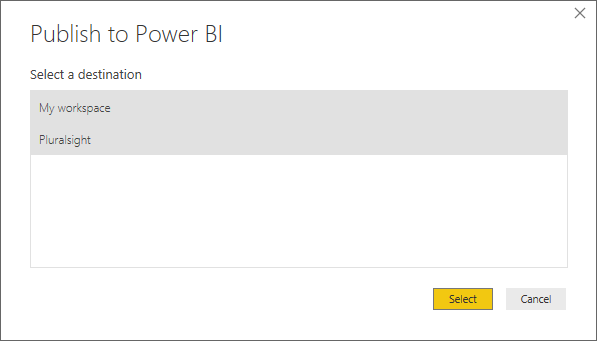
There are so many was to publish Power BI reports:
Personal workspaces
App Workspaces
Organizational content packs
Publish to web
Sharepoint
Power BI Premium
Power BI Embedded
Power BI report server
It can get a bit difficult to keep up with all of the options.
Session 6: Security and Auditing
There are three big pieces to securing Power BI: What data can be access, what reports can be accessed and what can people share. In addition to that, there are interesting features with row-level security built in to Power BI as well as SSAS.
In terms of auditing, much of that is going to be based on the Unified Audit log for Office 365, which requires some work to enable. There are also things you can do with PowerShell and with auditing data gateways.
Overview
Overall I’m pretty proud of the contents. This is the kind of precon I wish I had been able to attend 3 years ago so I had an idea of what I was doing.
I’m planning on building a salary calculator based on the data from played around with some of the numbers earlier. This time I’m planning on going a lot deeper.
I want your help and feedback! I want to know what would make a calculator most useful to you. Feel free to poke holes in my methodology and tell me how a real data scientist would handle this project.
In this post, I’m going to outline some initial findings as well how I’m planning to approach this project. All of the information below is based on a narrow subset:
USA, full postal code
DBA job
Between $15,000 and $165,000
Regarding zip codes, some people only entered a portion of their zip for privacy sake. In the final analysis, I plan on taking into account the ~200 US individuals who did that.
Initial findings
The data isn’t very predictive
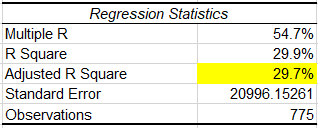
So I’m using something called a multiple linear regression to make a formula to predict your salary based on specific variables. Unfortunately, the highest Coefficient of Determination (or R2) I’ve been able to get is 0.37. Which means, as far as I understand it, that at most the model explains 37% of the variation.
Additionally the spread on the results isn’t great either. The standard deviation, a measure of spread, is about $25,000 on the original subset of data. Which means we’d expect 68% to be within +/- $25,000 of the average and 95% to be within +/- $50,000 of the average. So what happens when we apply our model?
When we apply the model we get something called residuals, which are basically the difference between what we predicted and what the actual salary was. The standard deviation on those residuals is $20,000. Which means that our confidence range is going to be +/- 20-40k. That to me doesn’t seem like a great range.
There are a few strong indicators
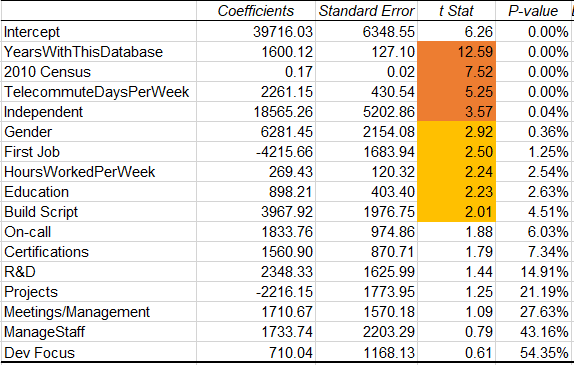
Let’s take a look at what we get when we do a multiple regression with the Excel Analysis ToolPak addin:
The two biggest factors by far seem to be how long you’ve worked and and where you live. In fact, we can explain 30% of the variance using those two variables:
The two other variables that are very strong are whether you telecommute and whether you are independent. When we add those, our adjusted R2 goes up to 33%.
Then after that we have a handful of variables that have a less than 5% chance of being erroneous:
Gender. It’s still a bit early to jump to conclusions, but it looks like being female might cost you $6,000 per year. This is after controlling for years of experience, education, hours worked, and if this is your first job. Gender could still be tied to other factors like a gap in your career or if you negotiate pay raises.

First Job. “First job” I identified as having identical values for years of experience and years in this job. If you haven’t changed jobs, it could be costing you $4,000, which lines up with my personal experience.
Hours worked per week. This is basically what you would expect.
Education. This is the number of years of education you received outside of high school.
Build Scripts and automation. One of the tasks people could check was if they are automating their work. Out of all the tasks people could list, this seems to have the biggest impact.
There are some interesting correlations
Part of doing a multiple regression is making sure your variables aren’t too strongly correlated or “collinear”. As part of this, is possible to find some interesting correlations.
If you are on-call, you are less likely to have post-secondary education. You are also probably overworked and learning PowerShell (no surprise there).
Certifications correlate negatively with being a dev-dba instead of a production dba.
If this is your first job, you are less likely to be working more than 40 hours per week. Maybe that $4,000 paycut is worth it
Independents also work less hours per week. So maybe your second job should be going independent.
If you telecommute, you might make $2,000 more per year for every day of the week you telecommute; but you are going to be working more hours as well.
Plans moving forward
So here is the current outline for this blog series:
This week’s T-SQL Tuesday is about a time that you solved a difficult technical problem. Unfortunately my brain doesn’t store events that way, so I can’t think of any good stories. Instead, I want to talk briefly about how games have made me a better programmer and a better troubleshooter.
Map-making in TFC
The first game I want to talk about is Team Fortress Classic. It’s a team based shooter from the late 90’s. I used to play this game all the time. But I did even more than that, I would make custom levels to play on with other people.
Mapmaking for TFC, was generally a simple process. You would create simple polyhedrons and then apply textures/patterns to them. Then you would place non-terrain objects, called entities, inside of your terrain. Everything is pretty straightforward…until you get a leak.
A leak is when the outside of the level is accessible to the inside of the level. Imagine you are building a spaceship or a submarine, if you have a leak it just won’t work. The challenge is that the level editor won’t tell you where you have a leak1. So how do you solve it?
In my case, you encase half the level in solid rock, so to speak. I would just make a big cube and cover up half of the level. If the level compiled, I knew my leak was somewhere in that half. Then I just kept repeating with smaller and smaller cubes.
I do the same thing all the time in my professional life. I’ll comment whole swathes of code. I’ll jump to half-way to the data pipeline to see where the error starts. TFC taught me to keep cutting the problem in half until I find it.
Guessing the secrets of the universe with Zendo
Undoubtedly proof that I was destined to be a programmer, one of my favorite board games ever is Zendo. It was actually one of my nicknames in college. It’s got a silly theme about discerning if something has the Buddha nature. In reality, it boils down to one player making up a rule, and everyone else trying to determine what the rule is.
If it sounds easy, I dare you to play something similar over at the New York Times. Chances are you are going to get it wrong.
The biggest thing Zendo taught me, was fighting against confirmation bias. It taught me to ask “What would prove my theory wrong”. Good troubleshooting involves guessing a cause, determining a test that will give you new information, and then running that test.
That test might be running a simpler version of a query that’s failing. It might mean adding a breakpoint to your code and inspecting variables.
Learning how to think systematically about this sort of thing has been tremendously useful.
Learning outside of programming
Troubleshooting is very often a set of skills and approaches that don’t need to do anything with technology per-se. I think looking at how we can get these skills in other places, like games can be very useful.
Speaking of other sources, there are two book I can recommend wholeheartedly. The first is How to Solve It which is about how to solve mathematical problems, but it provide a number of ways to break down a problem or approach it from different angles. The second is called Conceptual Blockbusting. It focuses on the nebulous issue of how we think about problem solving. It’s very much a book about thinking and I definitely enjoyed it.
Footnotes
1 Only after writing this blog post did I find an article explaining out to get the level editor to tell you exactly were the leak is. Sigh.
Many of the responses were along the lines of “Well, duh.” I, personally, felt much of the same thing.
But, I think with something like this, there is a risk for confirmation bias. If you already believed that women were underpaid, there is a chance that you’ll see this as more proof and move on, without ever questioning the quality of the data.
What I want to do is try to take a shot at answering the question: How strong is this evidence? Does this move the conversation forward, or is it junk data?
Consider this blog post an introduction into some statistics and working with data in general. I want to walk you through some of the analysis you can do once you start learning a little bit of statistics. This post is going to talk a lot more about how we get to an answer instead of what the answer is.
Data Integrity
So, first we want to ask: Is the data any good? Does it fit the model we would expect? Barring any other information I would expect it to look similar to a normal distribution. A lot of people around the center, with roughly even tails on either side, clustered reasonably closely.
So if we just take a histogram of the raw data, what do we get?
So, we’ve got a bit of a problem here. The bulk of the data does look like a normal distribution, or something close to it. But we’ve got some suspicious outliers. First we have some people allegedly making over a million dollars in salary. That’s why the histogram is so wide. Hold on, let me zoom in.
Even ignoring the millionaires, we have a number of people reporting over half a million dollars per year in salary.
We’ve also got issues on the other end of the spectrum. Apparently there is someone in Canada who is working as an unpaid intern:
Is this really an issue?
Goofy outliers are an issue, but the larger the dataset the smaller the issue. If Bill Gates walks into a bar, the average wealth in the bar goes up by a billion. If he walks into a football stadium, everyone gets a million dollar raise.
One way of looking at the issue is to compare the median to the mean. The median is the salary smack dab in the middle, whereas mean is what we normally think of when we think of average.
The median doesn’t care where Bill Gates is, but the mean is sensitive to outliers. If we compare the two, that should give us an idea if we have too much skew in either direction.
So, if we take all of the raw data we get a $4,000 difference. That feels significant, but could just be the way is naturally skewed. Maybe all the entry level jobs are around the same, but the size of pay raises get bigger and bigger at the top end.
Averages after removing outliers
Okay, well lets take those outliers out. We are going to use $15,000-$165,000 as a valid range for salaries. Later on I’ll explain where I got that range.
There are 143 entries outside of that range, or about 5% of the total entries. I feel comfortable excluding that amount. So what’s the difference now?
So the middle hasn’t moved, but the mean is about the same now. So this tells me that salaries are evenly distributed for the most part, with some really big entries towards the high end. Still, the $4,000 shift isn’t too big, right?
Wait, this actually is an issue…
Remember when I said 2 seconds ago that $4,000 was a significant but not crazy large? Well, unfortunately the skew in the data set really screws up some analysis we want to do. Specifically, our friend Standard Deviation. We need a reasonable standard deviation to do a standard error analysis, which we cover later.
Standard Deviation is a measure of the spread of a distribution. Are the numbers clumped near the mean, or are they spread far out? The larger the standard deviation, the more variation of entries.

If a distribution is a roughly normal distribution, we can predict how many results will fall within a certain range: 68% within +/- 1 standard deviation, 95% within +/- 2 deviations, 99.7% within 3 deviations.
Well, because of the way standard deviation is calculated, it is especially sensitive to outliers. In this case, it’s extremely sensitive. The standard deviation of all the raw data is $66,500 . When I remove results outside of $15-$165K, the standard deviation plummets to $32,000. This suggests that there is a lot of variability in the data being caused by 5% of the entries.
So let’s talk about how to remove outliers.
Removing Outliers
Identifying the IQR
Remember when I got that $15,000-$165000 range? That’s by using a tool called InterQuartile Range or IQR.
It sounds fancy, but it is incredibly simple. Interquartile range is basically the distance between the middle of the bottom half and the middle of the top half.
So in our case, if we take the bottom half of the data, the median salary is $65,000. If we take the top half of the data, the median salary is $115,000. The IQR is the difference between the two numbers, which is $50,000.
Using IQR to filter out outliers
Okay, so we have a spread $50,000 between the first and third quartiles. How do we use that information? Well there is a common rule of thumb that anything outside +/- 1.5 IQR is an outlier. In fact, when you see a boxplot, that is what is going on when you see those dots.
So, $50,000 *1.5 is $75,000. If we take the median ($90,000) and add/subtract 75,000 we get our earlier range of $15,000-$165,000
Standard Error Analysis
Okay, so why did we go through all that work to get the standard deviation to be a little more reasonable? Well, I want to do something called a Standard Error Analysis to answer the following question:
What if our sample is a poor sample?
What is our average female salary is lower because of a sampling error? Specifically, what are the odds that we samples a lower average salary by pure chance? “Poppycock!”, you might say. Well, standard error gives us an idea of how unlikely that is.
Importance of sample size
Let’s say there are only 1,000 female DBAs in the whole world, and we select 10 of them. What are the chances that the average salary of those 10 is representative of the original 1,000? It’s not great. We could easily pick 10 individuals from the bottom quartile, for example.
What if we sampled 100 instead of 1000? The chances get a lot better. We are far more likely to include individuals that are above average for the population as a whole. The larger the sample, the closer the sample mean will match the mean of the original population.
The larger the sample size, the smaller the standard error.
Importance of spread
Remember before we said that a reasonable standard deviation is important? Let’s talk about why. Let’s say there are 10 people in that bar, and that the spread of salaries is small. Everyone there make roughly the same amount. As a result the standard deviation, a measure of spread, is going to be quite small.
So, let’s say you take three people at random out of that bar, bribe them with a free drink, and take the average of their salaries. If you do that multiple times, in general that number is going to be close to the true average of the whole population (the bar).
Now, Bill Gates walks in again and we repeat the exercise three times. Because he is such an outlier, the standard deviation is much larger. This throws everything out of whack. We get three samples: $50,000, $60,000, and $30,000,000,000. Whoops.
The smaller the standard deviation of a population, the smaller the standard error.
Calculating Standard Error
Getting the prerequisites
To calculate the standard error, we need mean, standard deviation and sample size. Before we calculate those numbers, I want to narrow the focus a bit.
I’ve taken the source data, and narrowed it down to US, DBA and within $15,000-$16,5000. This should give us more of an apples to apples comparison. So what do we get?
We’ve got a gap in average salary of about $4,500. This seems quite significant, but soon we’ll prove how significant.
We’ve also a standard deviation of around $24,500. If salaries full under a normal distribution, this means that 95% of DBA salaries in the US should be within $52,500-$151,000. That sounds about right to me.
Calculating individual standard error
So now we have everything we need to calculate standard error for the female and male samples individually. The formula for standard error is standard deviation divided by the square root of the count.
So for females, it’s 23,493 / sqrt(123) = 2118. This means that if we were only sampling female DBAs, we would expect the average salary to be within +/- $2,118 about two thirds of the time.
So, if we were to randomly sample female DBA’s, then 95% of the time, that sample’s average would be less than the male average from before.
That seems like a strong indicator that the lower average salary for females isn’t just chance. But we actually have a stronger way to do this comparison.
Standard error of sample means
Whenever you want to compare the means from two different samples, you use a slightly different formula which combines everything together.
The formula is SQRT( (Sa^2 + Sb^2) / (na +nb)) . S is the standard deviation for samples a and b. Standard deviation squared is also known as the variance. N is the count for samples a and b.
If we combine it all together we get this:
The standard error when we combine samples is $1,154. This indicates that if there was no difference between the distribution in female and male salaries, then 68% of the time they would be within $1,154.
Well in this case, the difference in means is almost 4 times that. So if the difference in means is 3.88 standard deviations apart, how often would that happen by pure chance? Well, we would see this level of separation 0.01% of the time, or about 1 in 10,000.
Conclusion
I take this as strong evidence that there is a real wage gap between female and male DBAs in the USA.
What this does not tells us is why. There are a number of reasons that people speculate as to the cause of this gap, many in Brent’s original blog post and the comments below it. I’ll leave that to them to speculate what the cause is.
Tonight I got to present remotely to the Wisconsin SQL Server User Group on Execution plans. While it was definitely an honor, it was a challenge trudging through with a sore throat and cough. Below are the slides and code: Execution Plan Essentials 2017-12-12
A couple of people were asking for the code to my demos, so here it is! I’m utterly exhausted, but it was such an honor presenting to so many people. My favorite part was getting to thank a hard-of-hearing gentleman in sign language for asking a question at the very end.
A recent viewer of my new Pluralsight course had a question about data gateways and Power BI Premium. Specifically, do you need a pro license to install and administer data gateways? The short answer is probably not!
Installing data gateways
So when you install a data gateway, you need to log in as a user to register it with your tenant. Well it turns out that whoever is used there is set as the default admin for that gateway. I created a user with just a power BI free license, and I was able to install and administer that gateway just fine. I was also able to assign it to other gateways that already existed.
So, for normal usage you don’t have to be licensed with pro to setup and configure data gateways. I was honestly a bit surprised by this, but in retrospect is makes sense. Pro licensing is all about consuming reports.
What about Premium?
So, the original question was about Power BI Premium. Unfortunately, there’s no developer tier for me to test on, but I have a few guesses.
First, I reviewed the white paper and the distinction it makes between pro users and infrequent users is about producing versus consuming reports. It doesn’t really talk much about administration from what I could tell. Same thing for the faq:
Do I need Power BI Pro to use Power BI Premium? Yes. Power BI Pro is required to publish reports, share dashboards, collaborate with colleagues in workspaces and engage in other related activities.
Next, I did some searching, and found a page about capacity admins, but that doesn’t relate to data gateways specifically.
So based on what I found, I would assume that you don’t need a pro license to manage data gateways for premium. I would assume it would be a similar experience to normal Power BI.
I just gave a presentation for the Excel BI virtual group on database theory, and I’m really happy with how it went. I think it’s an undeserved topic quite honestly. So many people in the excel world learn everything ad-hoc and never have a chance to learn some of the fundamentals.
A number of questions came up relating to the engine and how the performance works. If you are interested in more detail on that, I suggest checking out my talk on DAX.
So, I think that DAX is a pain in the butt to use and to learn. I talk about that in my intro to DAX presentation, but I think it boils down to the fact that you need a bunch of mental concepts to have a proper mental model, to simulate what DAX will do. This is very deceptive, because it looks like Excel formulas on steroids, but conceptually it’s very different.
Here is the problem with DAX, in a nutshell:
This example below is a perfect example of that sharp rise in learning curve, and dealing with foreign concepts like calculated columns, measures, applied filters, and evaluation contexts.
So, one of the things I’m hoping to catalog are example where DAX is a giant pain if you don’t know what you are doing. People make it look really simple and smooth, and that can be frustrating sometimes. Let’s see more failures!
I need to sum an amount column, grouped by a column
Measure 1 := GROUPBY ( det, det[nbr], “Total AR Amt Paid calc”, SUM ( det[amt] ) )
I’m getting a syntax error
So automatically, something seemed off to me. Measures are designed to return a single value, given the filter context that’s applied to them. That means you almost always need some aggregate function at an outer level. But based on the name, you wouldn’t necessarily expect GROUPBY to return a single value. It would return values for each grouping instance.
If we take a look at the definition for GROUPBY(), we see it returns a table, which makes sense. But if you are new to DAX, this is really unintuitive because DAX works primarily in columns and tables. This is a really hard mental shift, coming from SQL or Excel.
What do you really want?
None of this made any sense to me. Why would you try to put a GROUPBY in a measure? That’s like trying to return an entire table for a KPI on a dashboard. It just doesn’t make sense. So I asked John what he was trying to do.
He sent me an image of some data he was working with. On the far left is the document id and on the far right is the transaction amount.
He wanted to add another column on the right, that summed up all of the amounts for transactions with the same document. In SQL, you’d probably do this using a Window function with a SUM aggregate, like here.
Calculated columns versus measures
This highlights another piece of DAX that is unintuitive. You have two ways of adding business logic: calculated columns and measures. The both use DAX, both look similar and are added in slightly different spots.
But semantically and technically, they are very different beasts. Calculated columns are ways of extending the table with new columns. They are very similar to persisted, computed columns in SQL. And they don’t care at all about your filters or front-end, because the data is defined at time of creation or time of refresh. Everything in a calculated column is determined long before you are interacting with them.
Measures on the other hand, are very different. They are kind of like custom aggregate functions, like if you could define your own version of SUM. But to carry the analogy, it would be like if you had a version of SUM that could manipulate the filters you applied in your WHERE clause. It gets weird.
My point is, if you don’t grok the difference between calculated columns and measures, you will never be able to work your way around the problem. You will be forced to grope and stumble, like someone crawling in the dark.
Filter context versus row context
So in this case we’ve determined we actually want to extend the table with a column, not create a free-floating measure. Now we run headlong into our next conceptual problem: evaluation contexts.
In DAX there are two types of evaluation contexts: row contexts and filter contexts. I won’t go too deep here, but they define what a formulas can “see” at any given time, and in DAX there are many ways to manipulate these contexts. This is how a lot of the time intelligence stuff works in DAX.
In this case, because we are dealing with a calculated column, we have only a row context, not filter context. Essentially, the formula can only see stuff in the same row. Additionally, if we use an aggregate like SUM, it only cares about the filter context. But the filter context comes from user interaction. Because this data is defined way before that, there is no filter context.
This is another area, where if you don’t understand these concepts you are SOL. Again, for the newbie, DAX is a pain.
What’s the solution?
So what is the ultimate solution to his problem? There are probably better ways to do it, but here is a simple solution I figured out.
SUM = CALCULATE ( SUM ( Source_data[Amount] ), ALL ( Source_data ), Source_data[Document] = EARLIER ( Source_data[Document] ) )
Walking through it, The CALULATE is used to turn our row context, into a filter context. Then it manipulates that filter context so SUM “sees” only a certain set of rows.
The first manipulation is to run ALL against the table, to undo any filters applied to it. In this case, the only filter is our converted row context. (confused yet?)
The next manipulation is to use EARLIER (which is horribly named) to get the value from the earlierrow context. In this case we are filtering ALL the rows, to all of them that have the same document. Then, finally we apply the SUM, which “sees” the newly filtered rows.
Here is what we get as a result:
How do we verify that?
A fourth pain with DAX is that it’s very hard to look at intermediate stages of a process, like you can with SQL or Excel formulas, but in this case we have a way. If we convert our SUM to a CONCATENATEX, we can output all the inputs as a comma separated list. This gives us a slightly better idea of what’s going on.
What’s the point?
My point is, that DAX, despite it’s conciseness and richness is hard to start using. Even basic tasks can require complex concepts, and that was a big frustration point for me. You can’t just google GROUPBY and understand what’s going on.
Again, check out my presentation I did for the PASS BI virtual group. I tried to cover all the annoying parts that people new to DAX will run into. That and buy a book! you’ll need it.