Author: Eugene Meidinger

  • A beginners guide to vibe engineering: Welcome to Vegas

    |

    In this post, I will assume 1) you have no experience with LLMs at all and 2) you think the idea of AI writing 80-90% of our code in the future is complete poppycock. Personally, I feel….less certain about the future, but I agree the claims of AI CEOs sound like total BS.

    First we’ll define vibe engineering, then I’ll give you the 6 rules for surviving the LLM Casino.

    What is vibe coding and vibe engineering?

    Andrej Karpathy had a long definition on Twitter of vibe coding that in many ways has been misconstrued to mean all sorts of things, like one-shotting from prompt to final product, or writing full software but never looking at the code. Here is my earnest definition:

    Vibe coding is when you enter an addictive flow state with an LLM slot machine. You test the software, provide natural language feedback, and may occasionally look at code, but you NEVER write a single line of code.

    As you can imagine, vibe coding is FUN, but in the same way that going to Vegas is fun. And in the same way, both are dangerous. Sometimes you get a slick looking website to show your Nordic friends, sometimes your MSPaint alternate history clone looks like crap, sometimes you delete prod. Fun!

    Vibe engineering is a little bit closer to going to Vegas and card counting or going to Vegas but with strict rules. When me and my husband went for Fabcon, we did 5-dollar blackjack. We both have addictive personalities and I’ve never properly gambled before, so we needed a plan and we needed to hold each other accountable.

    We agreed in advance we wouldn’t spend more than an allocated amount. We were having so much fun we changed that to allocated amount + winnings. Well, so much for willpower. Ahead of time, we also agreed that we were okay if we lost all our starting money. This was a $75 entertainment expense and not a bet. Cheaper than our Penn and Teller tickets, but not as cool either.

    So, we entered the den of vice with $75 between us. I ended up wasting $15 on roulette because I’m stupid and didn’t understand I could cash the roulette chips back out to regular chips? Did I mention this was my first time in a casino?

    Miles did really well, so between the two of us we left with $10 more than we started. Overall, we had a wonderful, wonderful time. We got to socialize with some vacationers. The dealer had to follow robotic instructions for how she played but was free to give us helpful tips on when to hit and how to beat her. Just purely delightful.

    Also, whenever I see slot machines now, I feel sick to my stomach about all the dark UX patterns. They don’t look like they did in the movies anymore. They are just giant wraparound screens with bright lights and sounds.  Horrific iPads warped by Mammon.

    Slot machines at my dying mall

    Slot machines are the ultimate skinner box designed to manipulate and abuse you. Utterly disgusting🤢. Remember, some casino games are more dangerous than others, so pick your poison wisely.

    Anyway, this is vibe engineering. Play stupid games, get stupid prizes, and have a plan along the way. Ready to start?

    The 6 rules in the LLM casino

    1. The house always wins and LLMs always screw up

    In gambling, the house always wins in the long term. Maybe not if you can count cards. Maybe not if you are lucky. But in general, assume you are going to lose your shirt. Don’t bet more than you are willing to lose.

    In the same way, assume the LLM will screw up eventually. For example, maybe it will delete your prod database. Maybe it will cause an AWS outage.

    Accordingly, take as many steps as possible to reduce the negative consequences of screw-ups. Use Git and commit frequently. Consider using a sandbox or docker container. Implement linting, type checking, and CI/CD.

    Additionally, only bet what you are willing to lose. Start with side projects. Start with tasks where if the code is completely wrong, nothing is hurt. Do tasks that are easily verifiable and have a low risk of subtle errors.

    2.Pick the games with the best returns

    Different casino games have different odds. Blackjack is one of the best games to play if you want to lose your money slowly. Keno and roulette are the worst (whoops!). So how do you pick games with the best returns for LLMs?

    LLMs are pre-trained on massive, massive internet-sized amounts of data. So, to a first approximation, languages that have a large number of Github repos like Python and Typescript will do better.

    Modern “reasoning” LLMs are trained on Reinforcement Learning with Verifiable Rewards. These are math and coding tasks where there is a known correct answer, and the models can be rewarded for getting complete or partial credit towards those solutions. So, to a second approximation, you want languages and problems where there are clear and correct solutions.

    In an interesting study, one of the best languages for LLMs is Elixir, in part because of the fact that there is often a single right way to do things in that language, unlike say PowerShell.

    3. Understand your poker chips

    In a casino, you often bet with poker chips. In the LLM casino you have two types of chips: tokens and time.

    Tokens are subword chunks that are how LLMs think, speak, everything. Model provider charge in tokens with different rates for input tokens, output tokens, and cached prompt tokens. When it comes to cost, this will be the number one thing to think about. Imagine if when you send a text message you got charged 1 cent per word. It would affect how you wrote!

    The other thing that’s easy to blow in LLM Vegas, where there are no clocks or windows, is time. Time building the wrong thing. Time waiting for the AI. Time cleaning it up. One study found experienced devs in complex repos wasted 20% of their time trying out Cursor when they thought it was making them faster. Another study found junior devs were not significantly faster for basic tasks in an unfamiliar library.

    And what do these games pay out? Well in lines of code of course. And tech bros will brag about 10k lines of code per day. But I think the Dijkstra quote here is relevant here.

    My point today is that, if we wish to count lines of code, we should not regard them as ‘lines produced’ but as ‘lines spent’: the current conventional wisdom is so foolish as to book that count on the wrong side of the ledger.

    Remember, the house always wins and LLMs always screw up.

    4. Go in with a plan

    It is fun, and entertaining, to see if Claude can recreate sand physics games from a single prompt. But for anything that you actually care about, you should build out a plan. LLMs “think” as they type, one token at a time, so if you can get them to do the thinking before the building, they perform better.

    Claude Code has a planning mode, which you should use frequently. I personally like SpecKit if I need more intensive planning and scoping. That said, I think most Spec-driven-development is just playing Barbie Dreamhouse but with LLMs as the Barbies and scrum personas as the outfits, but I find a little bit of it useful sometimes.

    But in general, don’t just “YOLO” your way through this. Don’t just give it a single prompt and walk away. Take the time to define success criteria, failure criteria, and the sorts of automated tests you want.

    5. Don’t get distracted by shiny lights

    Vegas is a sensory overload, and as an introvert, I hate it. Noises, sounds, the brightest colors you’ve ever seen, free drinks at the blackjack table. Vegas is designed to overstimulate you and keep you distracted. When I got there, I decided it was an ideal vacation for three sorts of people: the rich, kids in their 20s, drunks. Ideally all 3.

    Your coding agent is also subject to distraction. It is your job to created automated ways for your computer to slap it on the wrist and say “hey, stop that.”. Some people refer to this as backpressure.

    AI agents do best when they can sort of bumble around like a dumb Roomba, and bump into walls until they find their way to the solution. How can you put up those walls to help it?

    Use a typed or compiled language. Use linters. Use language service protocols (think IDE tools). Use automated tests. Use end to end tests and tools like Playwright. Use git pre-commit and pre-push hooks.

    Anything and everything so when your LLM is dumb like me and wants to play roulette you have an automated way to go “ah, ah, ah! no, no, no!”.

    6. Get in and get out

    One of the keys to getting good results from an LLM is to provide it with just enough information and nothing more. This is measured by the “context window” which is the sum total of tokens an LLM can see at once. This includes the system prompt, the user prompt, any MCP servers, and the chat history. Context rot is the idea that the more of that window is filled the more “confused” the LLM will get.

    Get in, get out, clear the context window frequently. If you are letting it run for one long session and it performs multiple compactions, which is where it tries to summarize the previous session and continue working. It’s known that quality quickly degrades after multiple compactions.

  • How I keep up with AI, and why you honestly shouldn’t

    |

    In 2016, I thought I knew how to keep up with technology. In 2026, I’m less sure.

    AI feels a bit like fast fashion. Oh you are wearing cerulean? Pfft. Everyone knows that chartreuse is in now. How embarrassing.

    Oh you are using the Power BI MCP server? Skills are in. Oh you are using skills? Everyone is wrapping agents in for loops and naming it after the dumbest character in the Simpsons. How embarrassing.

    In the beginning of this, I’ll cover why keeping up with AI is bad for your mental health and well-being and at the end I’ll share how I do it, in case slamming your hand in a door isn’t available as an option instead.

    The AI community is unwell

    The AI community, defined broadly as everyone talking about AI, is mentally and emotionally unwell compared to other communities I’m in. I don’t mean that as a slight. I’m part of that community and I’m not as grounded and centered as I would like. I have to take regular intentional steps to stay grounded. When I look at the distributions of folks, I see more illness than wellness, on average.

    So what do I mean? Due to familial reasons, I’ve been exposed to fantastical thinking on a weekly basis since I was about 11. I think I have the shape of it. And I see it regularly when certain folks talk about AI. Saying “AI is going to take our jobs” but not stopping to say “Well, if taken as true, what consequences would that have?” or “What evidence would I need to see to convince me otherwise”.

    No, there’s just a gut feeling, a confirmation bias, and a seeking of information to affirm that bias. An entire AI agent system indistinguishable from LLM psychosis, parody, or performance art.

    An ungrounding.

    Memetic viruses

    Swimming in these waters is unsafe because you might catch a memetic virus. What’s a memetic virus? Well, in high school there was one that went around called The Game. The way you played The Game was to not think about it. The moment you remembered its existence, you lost. Thankfully the webcomic, XKCD, found a cure.

    There are memetic viruses floating around, and one hit me briefly. The phrase “permanent underclass”. You ever watch a horror movie and for the next day you are jumping at shadows and kinda spooked? This one spooked me. Until someone pointed out the concept was fairly selfish, individualistic, and narrow. Fairly American too if we are being honest. If there’s going to be a “permanent underclass”, wouldn’t you much rather “Rage, rage against the dying light”?

    AI culture is, largely, internet culture. Meme and jokes and “jokes” and AI bots pushing agendas. If you spend too much time online and not enough time touching grass, you’ll find your very own mind virus that you haven’t been inoculated for. Be wary.

    A sane approach

    I think there’s a better way to think about all of this uncertainty. Imagine you were recently hired to work for a foreign company, like me with Tabular Editor. Now imagine that you had a very, very strong uncertainty if you were going to emigrate to that country in the future. So your range of needs goes from “I should learn a few pleasantries” to “I NEED to become fluent”. How would you approach that uncertainty?

    Well, some things in language learning can be crammed and some things can’t. Tuning your ear takes time, no matter how much you cram. Of the Scandinavian languages, Danish is the hardest to hear.  There’s a Norwegian comedy skit about this even. So, a great investment would be to listen to slow Danish podcasts or Danish music. Minimal effort, but you start the clock on things that can’t be rushed.

    With AI, the equivalent is to get a sense of the jagged frontier of AI. Use arena.ai to compare model strength. Track AI failures to make your own personal evaluation benchmark for new models. Build stuff. Anything to build your intuition of what AI does well and when it fails catastrophically. This intuition cannot be developed from reading about AI.

    An insane approach

    Or, you could, like me use Feedly to follow a large number  (~50) of RSS feeds. You could listen to 10 different AI-related podcasts. You could scan Hacker News on a daily basis. But I wouldn’t recommend it.

    I have different goals. For whatever reason, I decided that I want to teach and consult on AI. Well, I don’t want to consult on it. If you hand me an AI project, I’ll hand you 2x my usual rate. But just last week a customer was asking if it made sense to have Claude review our Data Warehouse design. Being able to articulate the pros, cons, and limitations there is important to me.

    Good luck in whatever your goals are and remember to go outside and enjoy some sun.

  • Is AI taking our Power BI jobs? Not exactly, but it’s getting bumpy.

    |

    If anyone tells you with certainty what’s going to happen to Power BI jobs because of LLMs, they fall into one of two categories:

    1. Bullshitters
    2. People who fired a consultant because AI helped them successfully do it instead.

    I fall into the former category and I’m going to impart all of my great wisdom in this blog post. But be aware than anyone who tells you what will happen more than 3-6 months out is bullshitting you. We are all just guessing and extrapolating.

    Enough with the pithy cliches

    I’m pretty tired of the “AI won’t take your job, but someone with AI will” cliche. I get it, it makes sense. But it’s also fairly reductionist. AI doesn’t need to replace you to make you lose your job. And learning to use AI effectively isn’t a guarantee that you’ll keep it.

    Some jobs are just gone. Chegg was a company that helped students cheat on homework and ChatGPT was a death knell for them. StackOverflow was in decline for a while but ChatGPT accelerated it. No amount of AI will help those employees keep their prior jobs. Those jobs are gone.

    Other jobs may go away from efficiency gains. Historically, if a technology causes 10 workers to be 11% more efficient, what does the company do? They fire one of the workers. We aren’t getting a utopia with 4 day workweeks, folks. That’s not how capitalism works.

    There are exceptions, however. ATMs make bank branches cheaper to run, so the number of branches proliferated, and the number of bank employees increased. The invention of the digital spreadsheet led to huge growth in the field and a whole new category of worker.

    Sometimes making something cheaper or easier to access increases demand. See Jevon’s Paradox as AI enthusiasts like to spout. But just as often it doesn’t.

    I don’t have any reason to believe that AI efficiencies will lead to increased demand for BI developers, I just don’t. It’s far, far more likely that the things AI will be able to do increases the demand for self-service greatly and the things it can’t do will lead to stable demand for those tasks.

    People will be able to easily build and prototype the reports they need themselves, but making sure they are building the right thing and validating the business logic will remain difficult and needed. Get good at that.

    Bi-athletes

    BI developers are bi-athletes. I compare us to chessboxers (yes that’s a real thing) or people competing in a biathalon (which is completely different than a triathalon or decathalon? WTH). On the spectrum of coder to designer, BI developers sit smack dab in the middle. Users never know what they want and we have to tease it out of them.

    We are therapists for people’s data.

    And here’s the key thing. Those same skills make us well-positioned to handle what is coming. It’s time to lean into the therapy part because the coding part is becoming less important. Where we sit on that spectrum is shifting.

    You thought you were a boxer but you need to get better at chess. You thought you were a skier but you need to get better at sharpshooting. You thought you were a coder but you need to get better at design and iteration.

    The bitter reversal for BI developers

    Every skill and attitude gap you’ve ever complained about in your users or customers is going to swing right back around and hit you in the face like a karmic boomerang.

    • Users don’t know what they want? You don’t know what you want AI to do.
    • Users change their mind when they see the report? You will change your mind when you see what slop AI codes for you.
    • Users aren’t good at writing specs and requirements? You aren’t good at writing specs and requirements.

    Every single skill you wish your users had when you try to do work for them, those are skills that you should be improving on a daily basis. All of those “soft” skills just got a lot less soft and a lot more critical to your job 5 years from now. Get cracking.

    Ethan Mollick just put out a fascinating blog post about his “vibe entrepreneurship” course for MBA students, and everything resonates to me. Everyone who wants to use AI will benefit from classical communication and management skills.

    Why Power BI and Fabric are safer for longer

    Based on my experience with vibe coding a lot of things, I think a lot of an LLM agent’s success depends on these 4 factors:

    1. The ability to safely make changes. Source control, workspace branches, containers, etc.
    2. The ability to automatically verify the results. Compilers, typed languages, unit tests, integration tests, etc.
    3. The ability to automatically receive feedback. Compiler warnings, type check warnings, language linters, git commit hooks, etc.
    4. Reinforcement Learning with Verifiable Rewards. Much of the modern improvement in LLM reasoning comes from RLVR and fine tuning a model based on real problems and measurable success. That’s easy to do for Python, hard to do for Power BI.

    When I look at Power BI and Fabric, it just isn’t there yet. Git integration for Fabric has been a sore spot and is on-going. The modeling side of Power BI is rock-solid but the PBIR metadata is not and there isn’t a decade of PBIP support.

    My 2×2 matrix of ideal AI tasks

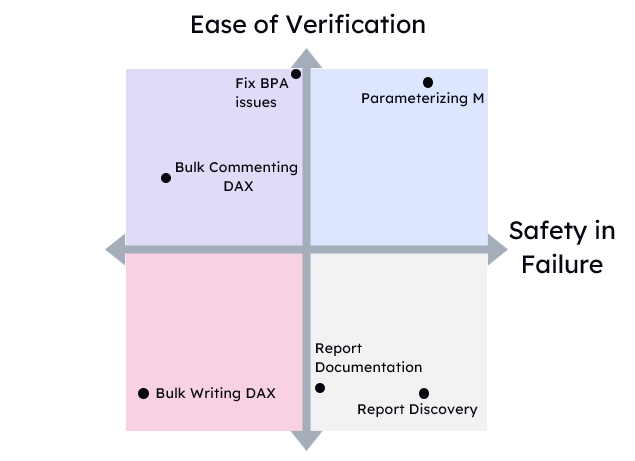
    I think folks in the Power BI and Fabric space are going to be safer for longer than say the backend coding space. But this will be unevenly distributed across types of tasks. Even today with the Power BI modeling MCP server, there are some tasks that are trivial to hand off to an AI and some that are very dangerous. Aim for the upper right quadrant here. Expect more tasks to move in that direction.

    Unfounded predictions for 2026

    If I had to guess where we will be by the end of 2026, and I am guessing, I think that the shockwaves that were sent out in December 2025 by Claude Opus 4.5 and ChatGPT 5.2 Codex will finally reach the shores of Power BI and Fabric by December 2026 at the latest.

    Change is coming.

    Now, if you are feeling overwhelmed, scared, or frustrated, I hear you. I feel you. My advice is don’t try to keep up. Try to keep situational awareness by picking a few bloggers or podcast to follow and try to learn by osmosis.

    It is much, much better for you to try to build something with AI for 15 minutes every day than it is to try to cram it in over a long weekend. Treat this like you would learn a new language or a new culture.

    No one learns a language by binging. No one ever feels FOMO because their friends are learning Danish.

    Although I will be learning Danish because of a new job I’m starting next week, so maybe you should feel a little FOMO 😜.

  • Lessons learned from Self-employment: 7 years in

    |

    It’s January 21st, 2026 as I write this. I’m the happiest I’ve been in years, at least since 2021. I’m the most hopeful I’ve been in years.

    On January 20th, 2025, I spent two days uncontrollably crying.

    In June 2025, I was $20k in debt and expecting to have to find a salaried job.

    So yeah. It’s been a year.

    Living in uncertain times

    I have a lot of colleagues whom I deeply respect and love, who sit on different parts of the political spectrum. I think we would all agree that political polarization is up, political violence is up, AI is going to be horrifically disruptive, and overall, we live in very uncertain times. We may disagree about why and for whom, but I think we agree about the generalities. 2025 was a mess and 2026 is going to be a bigger one.

    So, on January 20th I cried for 2 days straight. I sulked online. I asked for prayers even from folks who didn’t understand why I was distraught. Thank you to everyone who prayed for me and my family. Things are better now, but I’m still gladly accepting prayers from all denominations and good vibes form my atheist friends 😁.

    Ultimately, I felt out of control in terms of maintaining the safety and wellbeing of my family. We would probably be fine, more than fine, but there wasn’t much I could do if I was wrong. It felt like I had just bought a fistful of reverse-lottery tickets with a 1 in a million chance of ruining our lives. Lovely.

    Then my old pastor saw my Facebook sulk-posting. And he asked if there was anything he and his wife could do for us. I told him that his flock needed him more than I did right now, but there was one thing…

    My husband and I were coming up on our 10-year anniversary and a lot had changed in our lives. Enough that I don’t know if I’d still be married today if it weren’t for my faith. I couldn’t really control the outside world, but maybe I could host a small private protest of sorts. So, in August we renewed our vows on our 10-year anniversary, with a lot of help from friends and family.

    To hell with the world, life is worth living.

    Starting a podcast

    In December of 2024, I decided I wanted to start a podcast. My previous podcast SQLDataPartners was winding down and I was struggling with consistently producing weekly content that algorithm so strictly demanded.

    I would consider the podcast to be a modest success. We have 200-400 regular listeners although I’d love to have 1,000. Trying to make weekly content has been a failure. Too much of my life was a mess, trying to keep a steady even backlog of guests was a challenge, technology issues, etc. As a result I’ve decided to downgrade to every other week.

    I had decided to upgrade to the business version of Riverside for ~$400/mo. That was…stupid. I have very limited access to my digital marketer’s time (15hr/week), so I figured I was paying $100 per episode and if the extra features saved her a few hours per week, it was a huge win. In practice she barely used any of the features. A stupid, stupid waste on my part and an annual contract I regret.

    One thing I am truly proud of is highlighting voices you won’t find on YouTube or at conferences. An instructional design expert, and organizational culture expert, folks early in their careers, all sorts. I even let in some MSFT employees 😉. The thing I think about is I wouldn’t have my career if it wasn’t for Scott Hanselman and for Diabetes Magazine. When I got diabetes I thought my life was truly over, and seeing others that looked like me succeeding at life, kicking ass even, gave me the courage to try.

    I hope my podcast can give young folks the courage to try.

    Financial disaster

    This year was the year of financial disaster. At the beginning of the year, I was a bit of a hot mess and so I wasn’t paying close attention to our finances. We live comfortably in the rust belt, so I didn’t really need to. But Pluralsight retired half of my courses and my revenue from them dropped a significant amount. Over the three years since Pluralsight got bought by private equity my revenue dropped from comfortably covering all of my living expenses to covering mortgage, US health insurance, and a few utilities. Still nice, but not nearly enough to keep me afloat.


    And in 2025 I had committed to too many expenses. Repainting my office, redesigning my website, MVP summit, Fabcon. By the end of Fabcon, I realized I was suddenly broke.

    I did damage control, I took on debt, and by the end of it I had $20k in debt and no real customer pipeline. I had cut down on the consulting to do more courses on Teachable, but I was too much of a hot mess to manage more than 2 courses over 2 years.

    Thankfully, in June a customer was consolidating from Snowflake, Edify (Postgres PaaS), and Power BI to Fabric. They asked if I could help since I had provided Power BI training and support before. I gave them the nickel tour and said “I used to be a DBA and I know Power BI, but I have no ETL experience.”

    The response? “Well you are already in our system, you seem to know what you are talking about. You want to try to help us get Fabric going?”

    I’m quite lucky. This project is the only thing that prevented me from looking for a salaried job and being in debt.

    An elephant in the room – AI

    So why am I so joyful when the world is a mess? Well, I’m finding the joy in AI. I’ve been able to build more than before, troll Reddit by putting the M language in Python, and I’m just having fun. I’ve processed the grief that most of my code moving forward will be AI-written and I’m just riding the wave for now.

    I anticipate that 80-90% of the code I produce that isn’t customer facing will be AI-written. It’s a loss in many ways, but new skills to learn: unit tests, devops, docker containers, scrum, LLM evaluations, etc. I’m hoping I can make content too so people don’t get crushed by the wave. Because it’s coming.

    All in all though, if I could go back in time and un-invent LLMs, I’d do it in a heartbeat. I expect them to be a net-negative on society. But I can’t so I’m making the best of it.

    Oversharing

    I’m probably oversharing here. So why? Well partly because I decided that when I became a consultant, I would share the highs and lows, no matter how frustrating. I think a lot of people get burnt by survivorship bias and thinking consulting is for them. It isn’t. Don’t do it.

    But also, I see what AI is doing to our social connections and I hate it. AI slop. LinkedIn toxic positivity. Inauthenticity-as-a-service. I hate it. Where did my friends go?

    These days I’m hard to fire, so I hope this blog can be a bastion of authenticity and lived experience, for as long as I have the energy anyway.

  • Learning Claude Code, a wild 3 weeks, and the looming mental health crisis

    |

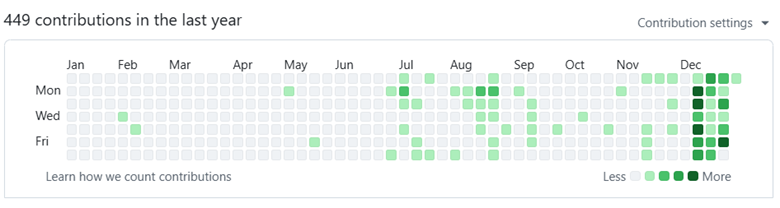
    Since most of my audience is data people, I’m pretty confident you can read a graph. Take a guess when I started using Claude Code.

    Yes, that’s correct. I installed Claude Code on December 14th with my pro plan. On December 15th, I upgraded to the $200/mo MAX plan, and I expect to keep it through 2026.

    Since then, I’ve created 17 new repos and generated ~50-100k new lines of code. Now, is it all low-quality slop? Perhaps! But there’s more.

    I’m going to say something, and you are not going to believe me and that’s alright. You shouldn’t believe me. We’ve been gaslit over the past decade with VR, the metaverse, blockchain, NFTs, and now AI. Our bullshit detectors have been overcalibrated like the immune system of a preschooler after their first year at school.

    Regardless, here it goes. Claude code has dramatically improved the quality of my life, it has brought me joy, and it’s probably quite dangerous for my mental health. Every time I think about how to describe it, I know it sounds insane. And after reading stories about LLM psychosis, I have moments where I have to make sure I’m not the one who is insane.

    Treating AI agents like browser tabs

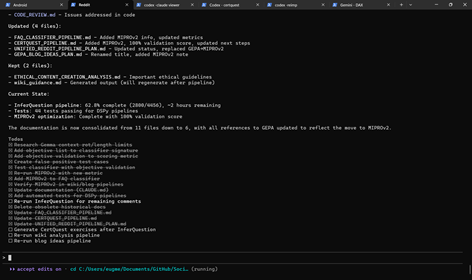
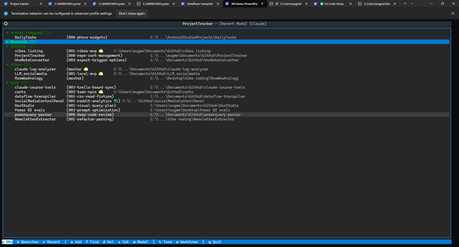
    I’m sitting here on a lazy Sunday, and I have 6 terminal tabs open with active agent projects and another window with 2 inactive agents, and 7 one-off tests or commands. I now treat terminal tabs the same way you treat browser tabs. A window full of them up on a second screen and I go through them when I’m bored or need a break.

    Active tabs
    Inactive tabs

    In 2024, if you told me my preferred IDE would be a little robot gremlin who lives in the terminal and says nice things to me, I would have laughed you out of the room. But here we are. Here it is.

    Claude Opus 4.5 just does stuff. Not consistently well, mind you. It was not trained well on PowerShell, like Gemini and Codex were. It always forgets I that have venv set up for Python. That’s why I added failures, manual interventions, and frustrations to my session viewer (click it to see how I generated 10k lines of code to expand DAX Studio). You can see the pain for yourself.

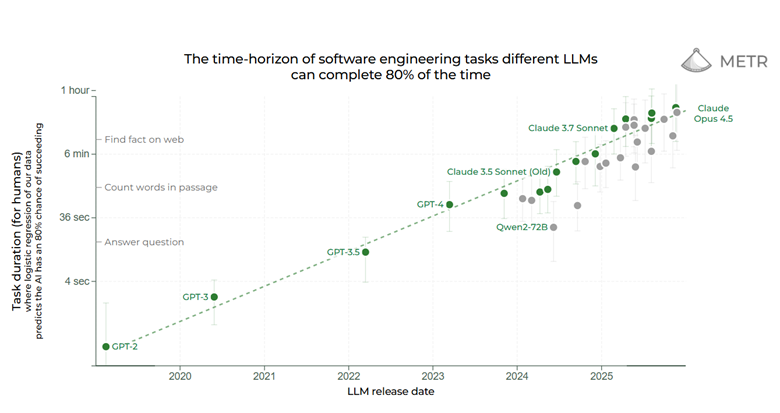
    But it just does stuff. I can tell it, “See what video card I have and then look up the largest local LLM that can fit in it” and 70-80% of the time, it just does it. Take it with a huge grain of salt, but studies by METR show it can correctly complete 30-minute tasks 80% of the time.

    This is a fundamental shift in how it feels to use these tools. Now I can ask Claude Opus to do something, leave the terminal up on a second screen and check back in 15-30 minutes later. Then when it gets stuck in a rut or when it wants to run commands that require my permission, I get it going again.

    Sometimes my little robot gremlin-buddy-guy comes back with a dead crow, arms outstretched like it has found the most valuable treasure. But more often than not he comes back with doubloons, rubies, and other little treasures, before he scurries away to do more of my bidding until I hit my subscription quotas.

    This is not without mental health risks.

    Metacat, metachat

    My mom is no longer able to safely take care of a pet and she loves stuffed animals, so my aunt got her two “meta cats”. The purr; they meow. They are meant for elderly folks with dementia. My mom will comment on their behaviors, and I think they bring her some comfort.

    Does she understand that they aren’t real? Probably, maybe, on some level? But she has schizotypal affect (think very light schizophrenia) and there are times where she isn’t in touch with reality, like when she tells me she’s going to start a bakery at age 76. For her these are harmless comforts. Harmless lies.

    But what if they said really nice things all the time, and helped her do whatever task she could imagine, but constantly made subtle mistakes. What if they helped her call commercial real estate to find the best bakery spot and they helped her take out a loan?

    What happens to your mental health when a robot gremlin-buddy-guy-dude just wants to do whatever it can to make you happy, even if it’s unhealthy or unsafe? I started watching the show Pluribus, and I keep thinking about the scene in the trailer where the protagonist says “If I asked right now, would you give me a hand grenade?” and they say “Yes, oh sure”.

    Humans are social creatures and we develop “parasocial” relationships constantly with podcasts hosts, Twitch streamers, celebrities. You name it. And I can tell you from personal experience, when you have a cute and quirky robot gremlin-dude-buddy-guy-friend who lives in your terminal, works with you daily, and feels like an entity that just wants to help you, well you develop a parasocial relationship with a pile of linear algebra.

    This just doesn’t feel safe and people are going to get hurt. By a pile of linear algebra with a spunky attitude.

    Why I am joyful

    Gloomy, I know. So why am I joyful? Why am I excited about 2026?

    Claude code is allowing me to build applications that improve my health and behaviors and it is allowing me to have more fun with coding.

    Imagine that fun side project you’ve always wanted to do but haven’t had the time, energy, and focus to do. If you could build it by yourself in a focused week, you could build it in a weekend with the help of your robot gremlin-guy-buddy-dude-friend-coworker.

    If you could bang it out in a weekend by yourself with a lot of focus, you can build in an unfocused day with 30 minute check-ins.

    Here are some things it has allowed me to do, that bring me joy:

    • Personal health app. Now I have an Android app to track my exercises and help me clean on brain-dead days.
    • DAX visual plan explorer. I’ve always missed visual execution plans from SSMS and I’ve always wanted to have that in DAX Studio. Now I have a working PoC.
    • Relationship app. Now I have an android app to help me and my husband track movies we want to watch from TDMB, YouTube channels we like to watch together, Grocery shopping list, etc.
    • Random experiments. I’m seeing if I can write M and DAX runtimes in Python and TypeScript. I’m seeing if I can rewrite Scorched Earth for DOS into HTML5. I’m seeing if I can take my 4,000 Reddit comments and turn them into blog post ideas.

    So in summary, I’m the happiest I’ve ever been in years, the most excited about coding I’ve been since college, and I keep asking myself “If I ask my robot gremlin for a hand-grenade, would he hand it to me? Happily?”

    Yes, yes it would.

  • The Power BI modeling MCP server in plain English

    |

    Microsoft has released a Power BI modeling MCP server. The responses have ranged from “This is awesome!” to “I have no idea what any of this means”. So, in this article, I hope to explain what this means in plain English and without any assumptions of AI background.

    Understanding agents

    LLMs, or large language models, take in text (stored as “tokens”, or sub-word chunks) and return text. By itself, an LLM can’t really do anything in the world unless you, the human, are kind enough to blindly copy and paste executable code.

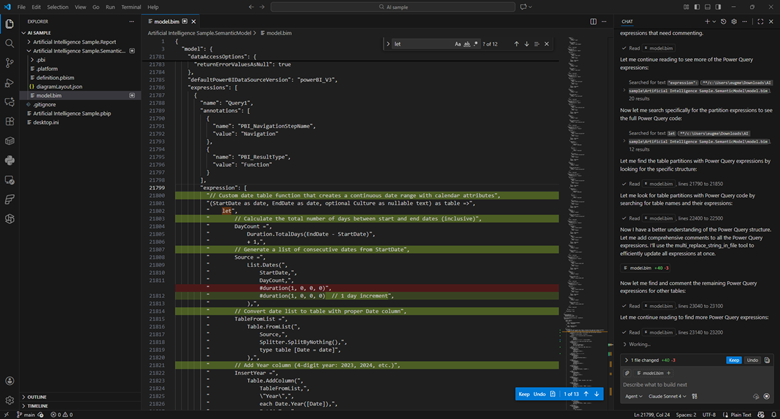
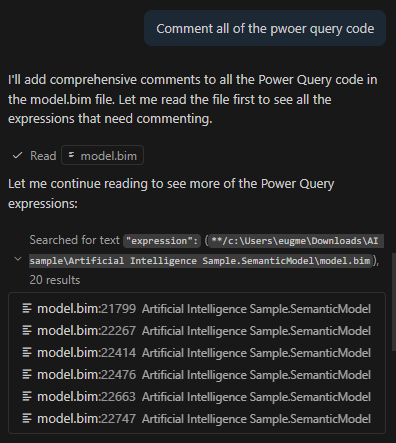
    An “agent” is an LLM run in a loop, with access to external tools, aimed at some specific goal. For example, instead of copying and pasting M code to be commented, I can use Claude Sonnet in agent mode and ask it to comment all of the power query code in my model.bim file (see the TMSL file format and the PBIP project format). I can then view and approve those changes in VS code.

    The LLM is able to make those changes autonomously because VS Code provides it with tools to search and edit files. Now, I’m still able to approve the changes manually, but some folks will run these tools in “YOLO” (you only live once) mode where everything is just auto-approved.

    Suffice it to say, this can be very dangerous.

    Managing context

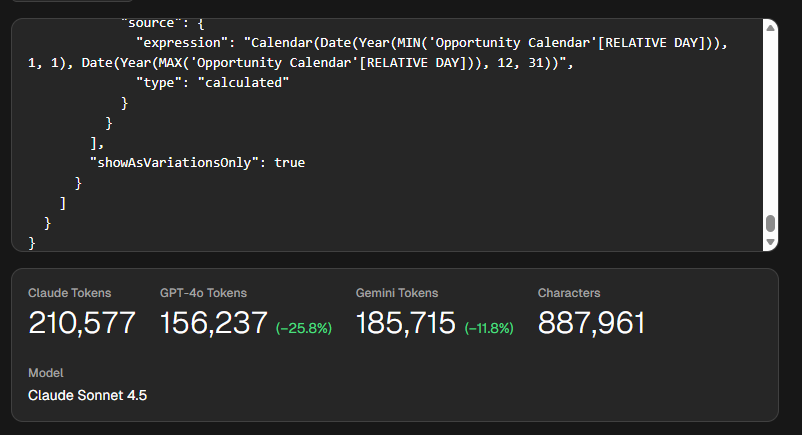
    This approach has tradeoffs. Model.bim is a “monolithic” file, so everything is in there. In this example, it’s a 26,538 lines of JSON. This file takes around 210,000 tokens for Claude, which exceeds its default 200k context window. The context window is how much “context” (prompts, chat history, tool descriptions, file contents) it can handle.

    Put plainly, this file is too big for Sonnet to reason about in full. Additionally, since you pay per token (both input, output, and “reasoning” tokens), this would be an expensive request. Claude Sonnet 4.5 charges $3 per million tokens, so simply reading the file would cost you 63 cents.

    Now, lets say you used Claude’s extended context window, which can go up to 1 million tokens. You still run into an issue called “context rot”. What this means is that the more context you provide the LLM the more likely is to get “confused” and fail at the requested task.

    There are two ways to address this. First, is VS Code provides search tools, so the LLM is able to hone in on the relevant parts and limit how much context it receives.

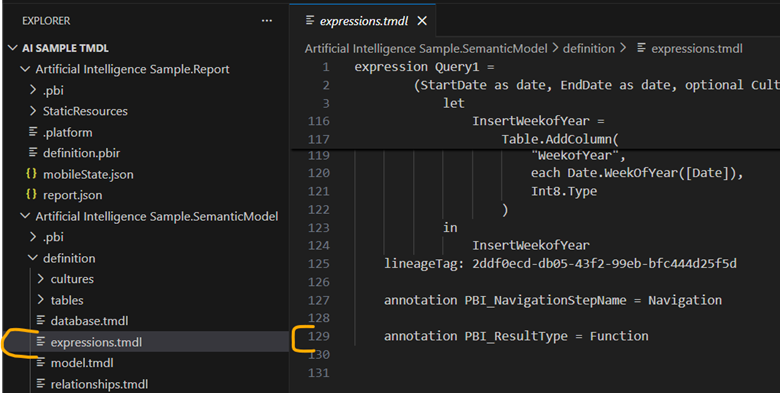
    Second, if I were to switch to the TMDL format, I would have a bunch of smaller files instead of one monolithic one. Now all of my relevant Power Query is in an expressions.tmdl file. This file is only 129 lines of TMDL and 1,009 tokens. Much much better. Reading this file would cost you 0.32 cents.

    But, what if we want to interact with the model more directly?

    Understanding MCP servers

    This is where MCP servers like the Power BI modeling MCP server comes in. MCP stands for “Model context protocol”. It is a fairly new protocol for providing LLMs access to external tools, similar to an API. One key difference is MCP is self-discovering.

    One of the first commands that MCP servers have to support is list_tools. This means that the API surface area is provided at runtime and is exposed via JSON. APIs, in contrast, tend to be slow moving and will often be versioned.

    An MCP server is a piece of software that is run locally or remotely and provides access to three things: tools, resources, and prompts. Tools are simply JSON-based APIs that allow an agent to do something in the world. Resources are data that is provided as if it was a static file. And prompts are sample prompts to help guide the LLM.

    The modeling MCP server allows the LLM to not only change DAX in the model, but run DAX queries against the model to self-validate. Does it always do this correctly? No.

    So far, I’ve been mildly impressed because the MCP server provides a very long list of tools and Claude Sonnet 4.5 seems to be able to navigate them fairly well. Sometimes it gets it wrong and needs to retry, or sometimes it stops short of the obvious conclusion and needs some guidance. But overall, it seems to work well.

    Okay, but is it useful?

    I don’t know yet! I’ve only started playing with MCP servers, including this one, a few weeks ago. However, so far I’ve found it really useful for situations where I am parachuted in to a report and have 0 context going into it. Having an agent that can poke around, try things, and report back, is easily able to save me hours of time.

    I’ve been told this is a fairly niche use case, and it is. As a consultant this happens to me much more often than someone who works with the same reports on a daily basis. In any case, I think this technology is worth paying attention to because I can see situations where it could save hours of strife.

    Right now, here is where I anticipate this tool being the most useful:

    • Doing discovery on ugly, poorly documented models.
    • Mass commenting code. This requires review and guidance to avoid really dumb comments like adding one for every column with a changed type.
    • Bulk renaming.
    • Moving DAX code upstream to Power Query, or moving Power Query to SQL.

    You’ll notice that nowhere in that list is “create a model from scratch”. I think as time goes on, we’ll find the flashiest demos are the least representative of how people will use tools like these.

    If you found this helpful, please let me know. I’m working on “Hands-on LLMs for Power BI developers” course, and I have no idea if this is all hype and if I’m just wasting my time.

  • Learning to Use LLMs as a Data Practitioner

    |

    We are in a weird, and frankly annoying, place with AI. Annoying because it’s being shoved in every single product, like notepad or MS Paint regardless of usefulness. Also annoying because the gap between LinkedIn influencer post and real design patterns used by practitioners is the largest I’ve ever in my career, outside of blockchain and NFTs.

    With AI, a thousand snake oil salesmen can each make something impressive looking in 15 seconds with a single prompt, but it takes months to learn how to make anything useful. So much sizzle with no steak.

    But it’s weird too. It’s weird because AI’s have a jagged frontier of capabilities. It’s as if Deep Blue could beat a grandmaster at chess, but might also set your kitchen on fire by accident. And it gets even weirder because that jaggedness is idiosyncratic to each and every single person using it. Minor variations in prompts, like a single space, can have huge impacts on the output. ChatGPT and Claude have memory features, meaning the experience is tuned to each individual.

    It reminds me of how TikTok’s algorithm would tune my feed so precisely that I would think that I was quoting some popular rising trend to a friend. But they would have no idea what I was talking about at all. Their feed would be completely different. We were in our own little worlds thinking we had a view of a fuller reality.

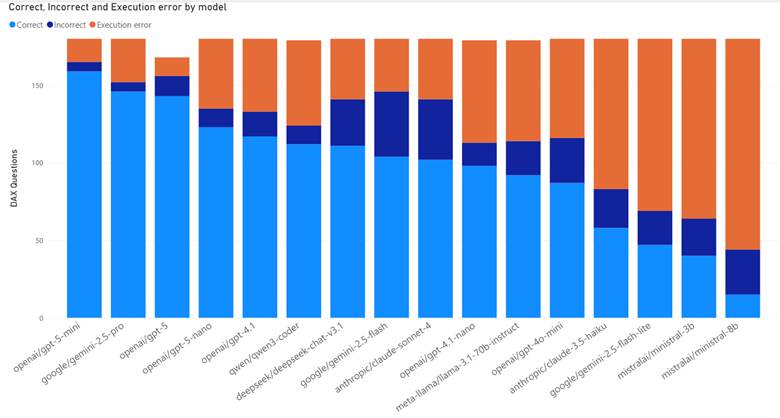
    On top of that, capabilities vary hugely by model, tool, and whether you are a paying subscriber (DAX quality by model). When I use ChatGPT, I find that I get terrible results for Microsoft Fabric questions unless I’m using both web search and thinking mode.

    Simply put, we are not speaking the same language when we talk about these things. Both for the hype and the hate.

    So how the heck do you get a handle on LLMs? How do you use them?

    How to learn how to use LLMs

    I’ve been mulling over the best way to cover this content and I keep vacillating. Do I cover it by tool? Do I cover it by Power BI feature? Project phase?

    But as I write this post, I think the best order is below:

    1. Develop understanding
    2. Develop intuition
    3. Develop experience
    4. Learn the tools
    5. Develop expertise

    Develop understanding

    First, you need to learn enough of the theory to understand the sentence “LLMs are next token predictors”. If you can’t explain to a regular human what that sentence means, you have critical gaps in your understanding that will make life difficult later.

    There are many intuitions that you might have that are just plain wrong. For example, you might be surprised when it can’t tell you how many R’s are in strawberry, until you learn that LLMs see the world as sub-word chunks called “tokens”.

    Or you might not realize that LLMs are non-deterministic but they aren’t random. If you ask an LLM for a “random number” it will overwhelmingly return 42, 37, 47, 57, 72, and 73.

    Here are some resources I recommend for getting started:

    And here are some resources I recommend for keeping up:

    Develop intuition

    Next you need to try stuff and see where LLMs fail, and where they don’t! Many people’s understanding of the failure modes of LLMs is quite shallow. People focus on “hallucinations” for precise facts. LLMs are at best lossy encyclopedias that have been hyper compressed, in the same way that a scrunched up JPEG loses a lot of the original detail.

    But here’s the thing, as a practitioner, I don’t care if the model hallucinates. My use cases tolerate a certain amount of lies and nonsense.

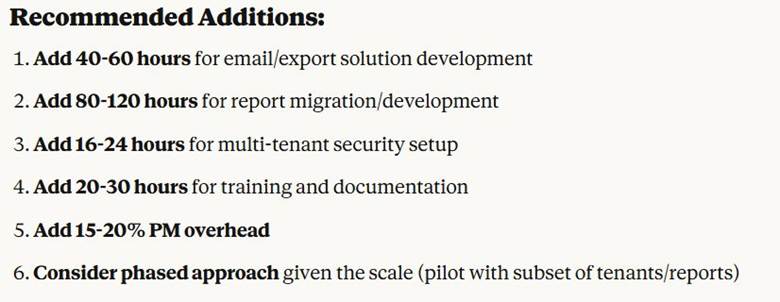
    What I care about more are more subtle failure modes. I care about subtle bugs in code, about subtle technical debt, about Claude Opus recommending I extend my Power BI Embedded SOW from 48 hours to 230-280 hours instead (I did not follow its advice).

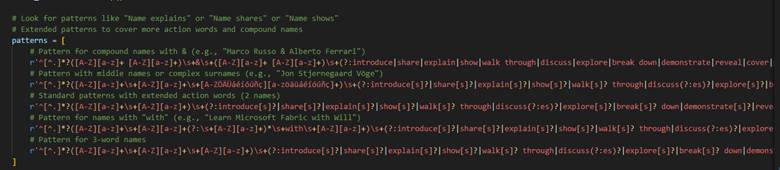
    I care about agents not seeing the forest for the trees and writing a 1,000 character Regex because it never thought to back up and use a different method. Instead, it just kept adding exceptions and expanding the regex every time I presented a new use case to parse.

    Develop experience

    As you start to get a sense in your gut of what these things can and cannot do, you need to start using them in your work, in your everyday life. You’ll discover things about contours, how these tools relate to the work that you do, and how they suffer with domain-specific languages like DAX or M.

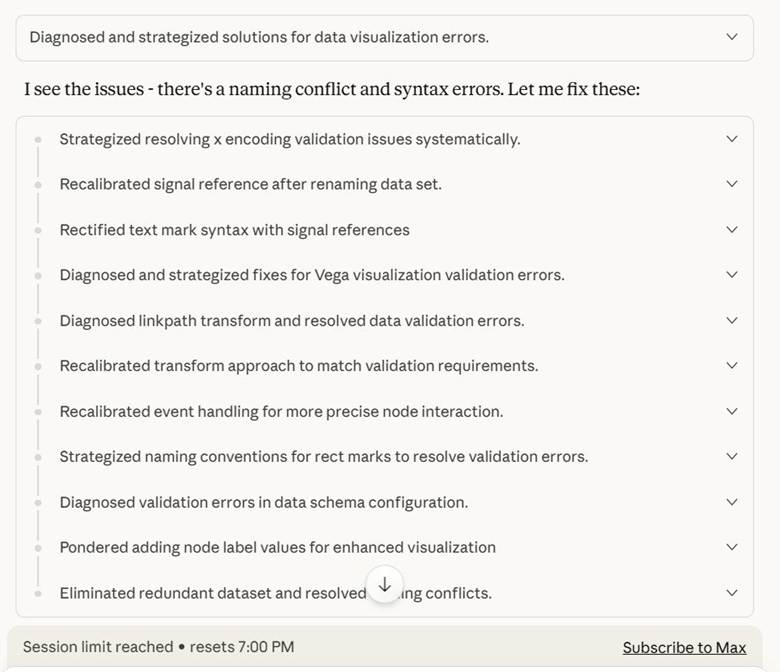
    You discover that Deneb visuals consume a lot of tokens and that Claude Opus will burn through your entire quota by spinning its wheels trying to make a Sankey chart.

    You discover it can write a PowerShell script to extract all the table names from a folder of .sql scripts. Saving you hours of time as you set up Copy Jobs in Fabric.

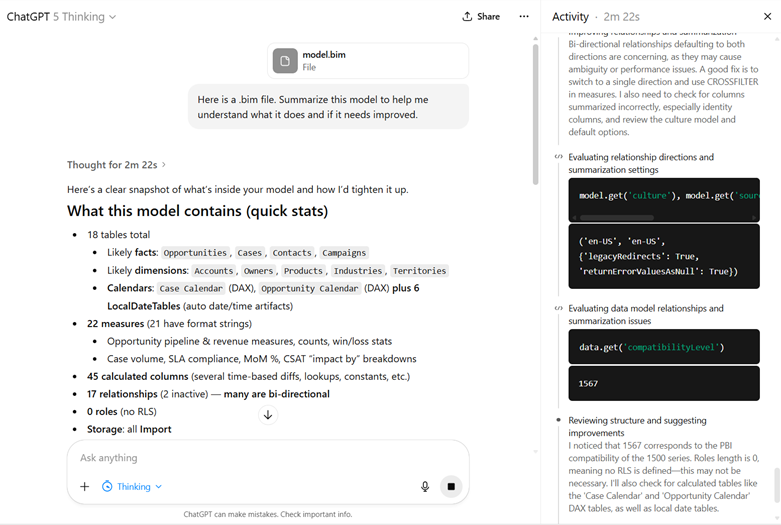
    You upload a .bim file of your data model to GPT-5 Thinking and 2 minutes later you get a summary that saves you hours of getting oriented to a report you inherited.

    You just do stuff. And sometimes it works. Sometimes it works really well. And you go out like a forager looking for mushrooms in the woods. Knowing that some are great. Knowing that some are poisonous and will delete your production database.

    My aunt once told me there are bold foragers and old foragers, but no old, bold foragers. So, consume AI with caution.

    Learn the tools

    At some point, you are going to have to learn how to do more than copy and paste stuff into the chat window. In a free video and paid whitepaper, Kurt Buhler describes a progression in complexity of tooling:

    1. Chatbot
    2. Augmented Chatbot
    3. Agent
    4. Asynchronous agents

    I think this is a pretty good progression to follow. Getting a handle on tooling is one of the most overwhelming and frustrating pieces of all this. The features are constantly changing for any given tool and nothing is standardized across tools.

    Pick a provider

    The first thing to do is to pick a model provider. Any of the frontier model providers will do (OpenAI, Anthropic, and Google). You absolutely do not want to go with a free model provider because it will give you a stunted perception of what these things can do. Additionally, if you are paying you can request they don’t train on your data (ChatGPT, Anthropic).

    Here are my personal recommendations:

    • If you want the best possible developer experience, go with Anthropic. Their models are known for their code quality. Their CLI tool has an immense number of features. They were the ones who pushed forward the MCP idea (for better and for worse). My biggest issue with them is their models can over-engineer solutions.
    • If you want great web search, go with OpenAI. Because I work with Microsoft Fabric if I ask an LLM questions, I will get trash answers unless it is good at using web searches. GPT-5 Thinking with web search has been phenomenal for me (Simon Willison calls it a research goblin).
      • I’ve heard good things about Perplexity and Google AI Mode, but haven’t used either.
    • If you live and breathe VS Code, look at Github Copilot. While VS Code does support Bring Your Own Key, Github Copilot can be nice since it easily allows you to try out different models. Also, because Github is owned by Microsoft, I expect GitHub Copilot to receive long term support.
    • If you want to compare models easily for chat use cases, look at OpenRouter. Open Router makes it stupidly easy to give them $20 for credits and then run the same exact prompt against 5 different models. They have a simple API for automating this.

    Working with models

    Next, you need to pick how to interact with these model providers: chat, IDE, or CLI.

    For editors stay away from VS Code clones like Cursor. These tools are in a precarious position financially and have a high risk of going under. Or in the case of Windsurf, end up being part of an acquihire and then the business is sold off for parts.

    The core issue is that services like Cursor or Github Copilot charge a flat rate for requests to models they don’t control (GitHub Copilot and ChatGPT being an exception). So, if the price for a model goes up because it consumes more tokens (reasoning models are expensive) then these middlemen get squeezed.

    As a result, they all start out as sweet deals subsidized by VC funding, but then eventually they have to tighten the screws, just like how things went with Uber and AirBnb. Additionally, users find new and inventive ways to burn tokens like running agents 24/7 and costing Anthropic tens of thousands of dollars per month. Here are some recent plan changes:

    • Cursor updated their plan from request limits to compute limits in June 2025.
    • Github Copilot began billing for premium requests in June 2025.
    • Replit introduced “effort-based pricing” in June 2025.
    • Anthropic introduced weekly rate limits in August 2025.

    As one way to deal with increasing cost and usage demand, these model providers are providing an “auto” setting that automatically routes requests, allowing them to use cheaper models (Cursor, Github Copilot, GPT-5).

    Lastly, a lot of the current hype is about command line interfaces. Anthropic, OpenAI, Google, and Github all have them. I think you can get pretty far without ever learning how to use these tools, I think if you want to go truly deep, you will have to pick one up. There’s some really cool things you can do with these if you are comfortable with coding, Git source control, and shell scripting. Simon Willison finds he is leaning more towards CLI tools instead of MCP servers.

    Developing expertise

    As with anything else, the two best ways to develop expertise are to learn the internals and teach others. Both of these things force you to learn concepts at a much deeper level. Unfortunately, the return on investment for teaching others is very low here.

    First, because things are changing so quickly that any content you make is immediately out of date. I gave a presentation on ChatGPT over a year ago, and now it’s completely irrelevant. There are some useful scraps relating to LLM theory, but how people use these tools today is totally different.

    Second, is because of social corrosion. The lack of care that people put into the accuracy and safety of their content is frankly stunning. Because social media incentivizes quantity over quality, and because AI is over-hyped right now, I expect that any content I produce will be immediately stolen and repurposed without attribution. In fact, a colleague of mine has said that people have taken his free content and put it behind a paywall without any attribution.

    So, in that case, how can we develop an understanding of internals?

    One option would be to build your own LLM from scratch. This is a great way to give you a deep understanding of tokenization and the different training phases. Andrej Kaprathy recently released nanochat, a project to build a kindergartener level AI for $100 of compute.

    A second option would be to develop your own MCP server or tools for the AI agent. Additionally, configuring Claude subagents are a way of thinking more about the precise context and tools provided to an agent.

    Another option would be to build an evaluation framework (often shortened to “evals”). One weekend, I did some “vibe-coding” to use OpenRouter to ask various models DAX questions and see how they performed against a live SSAS instance. Doing so forced me to think more about how to evaluate LLM quality as well as cost and token consumption.

    I hope this extensive guide was helpful for you to start learning how to work with LLMs!

  • Power BI Consulting: What Is in the Course?

    This course is launching April 8th, 2025 for $10 for 24 hours. Then it will be $50 until April 13th.

    Below is a summary of the contents of the course.

    Module 1 – Choosing to consult

    This module is a reality check on why you want to consult and what things you should consider before making the jump. Module 1 videos are available for free on YouTube and on the course site.

    In addition to the videos, there are 3 bonus docs:

    • Readiness Checklist. This is a checklist of thought exercises to make sure you are ready to take the leap.
    • Burn Rate Calculator. This is a simple excel file to estimate your monthly income and see how many months you can work with your existing savings.
    • Recommended Reading List. A list of recommended and optional reading, podcasts, and videos for each module.

    Module 2 – Paperwork

    Module 2 focuses on the paperwork involved with getting started. In short, you will want:

    The module also includes some quick demos on tracking time with Toggl and creating an invoice.

    Module 3 – Sales and Marketing

    This module covers the fundamentals of sales and marketing with core concepts like the AIDA model and the sales funnel. It talks about how consulting is a high-trust work, and your sales and marketing strategy should reflect that.

    Module 4 – How to Scope

    The scoping section covers what goes into a scope of work, and how to estimate time and overall scope. It explains what deliverables are and how they can vary in concreteness.

    It also includes a private custom GPT that you can interact with to practice gathering requirements. If you are stuck, there is a document with a list of questions to ask the GPT. I also very quickly demo using Microsoft Word to write a scope of work.

    Module 5 – How to Price and Contract

    This module talks about three of the main pricing models: hourly, flat rate, and value pricing. It explains how to estimate your hourly rate based on your salary and desired role.

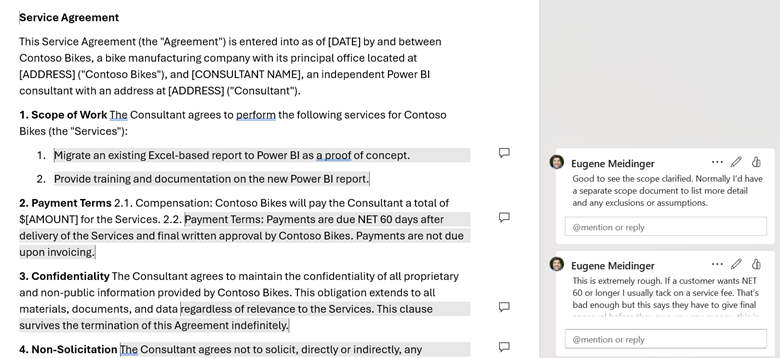
    For contracting, the module covers the gist of what should go into a service agreement and what to watch out for. As an exercise, I’ve included an intentionally malicious service agreement that you need to review for problems. This exercise also has a custom GPT for practicing contract negotiation. As part of the exercise, I have a marked-up version of the contract if you are stuck finding problematic clauses.

    Module 6 – Your First Project

    This final module helps to answer the question of how you know you are ready skill-wise. It talks about some of the mental health hurdles to expect when working for yourself. Finally, it covers some specific technical details of Power BI consulting and that first customer.

  • SUM and SUMX often have identical performance.

    For years, I told people to avoid iterators. I compared them to cursors in SQL, which are really bad, or for loops in C# which are normally fine. I knew that DAX was column based and that it often broke down when doing row-based operations, but I couldn’t tell you why.

    Advice to avoid iterators is often based on a misunderstanding and a misapprehension of how the Vertipaq engine works. If you are blindly giving this advice out, like I was, you are promoting a fundamental misunderstanding of how DAX works. We think that they are running row-by-agonizing-row (RBAR). Toiling away and wasting CPU.

    The truth is that SUM and SUMX are the same. Specifically, SUM is syntactic sugar for SUMX. That means when you write SUM, the engine functionally rewrites it as a SUMX. There is no performance difference. There is no execution difference. There are identical execution plans. You can look for yourself.

    Looking at the data

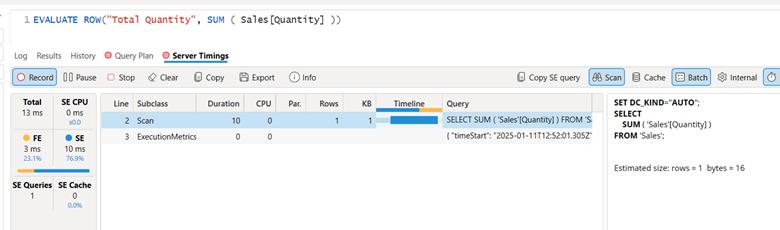
    Here is the evaluation of SUM over 100 million rows of Contoso generated data, gathered with DAX Studio. With caching off, it takes 13 milliseconds and performs a single scan operation.

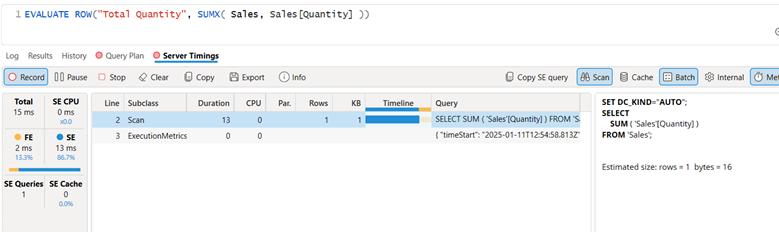
    Here is SUMX over the same data. 15 ms, same scan operation, same xm_SQL output on the right. Any DAX within 4ms should be considered to have functionally identical performance, according to SQLBI.

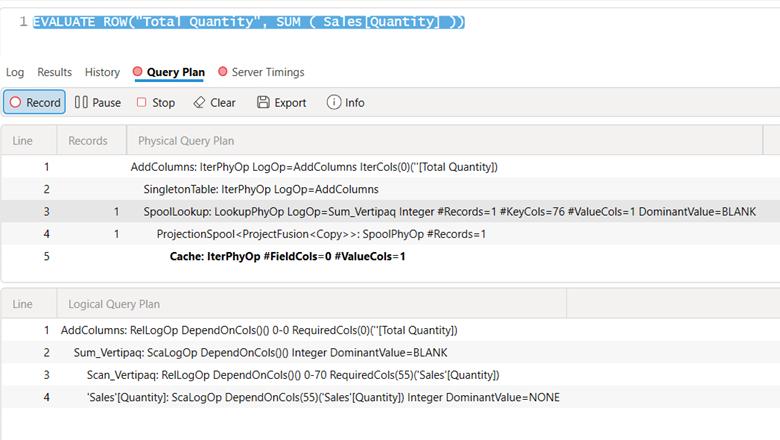
    Here are the physical and logical execution plans for SUM:

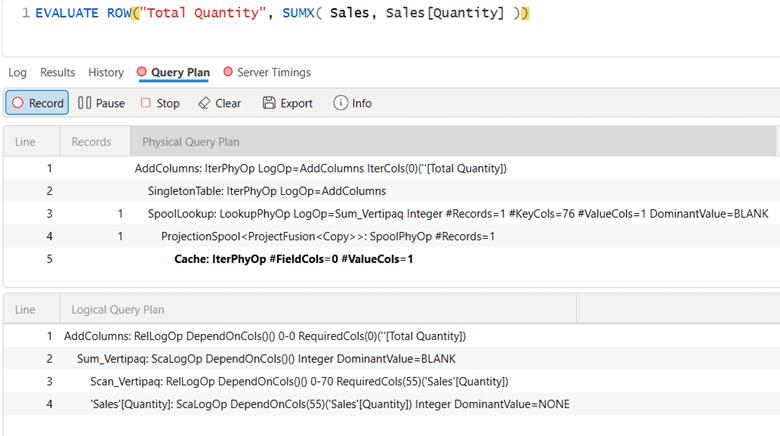
    Here are the logical and physical plans for SUMX. Identical.

    Why the confusion?

    So why is this a point of confusion? It is good to avoid row-based operations in general, but the engine often optimizes those away behind the scenes. So a blanket ban on SUM is silly and misguided.

    The fact of the matter is that if you stick to functions like SUM then you will fall into the pit of success. You will have better performance, on average, because the code you write will better align with how the formula engine and the storage engine work. CALCULATE + SUM is like having a safety on your code and when you have to step outside of that and use iterators like SUMX or FILTER you know that you have to be more cautious.

    Sticking to SUM will force you to engage in patterns that often lead to better performance. But SUM by itself makes no difference.

    But beyond that, it’s easy to write really, really bad code with iterators. If you put an IF statement inside of your SUMX then you will see CALLBACKDATAID, which is a sign the storage engine is having to make calls to the formula engine to handle logic it can’t handle by itself. Depending on how poorly you write your SUMX, it may do the vast majority of the work in the formula engine instead of using the storage engine and sending back data caches.

    If you want to learn more, I recommend checking out the super comprehensive book by SQLBI or my course on performance tuning.

  • Microsoft Fabric Guidance for Small Businesses

    |

    If you are a small (or even medium) business, you may be wondering “What is Fabric and do we even need it?” If you are primarily on Power BI Pro licenses today, you may not find a compelling reason to switch to Fabric today, but the value add should improve over time as new features are added on the Fabric side and some features get deprecated on the Power BI side.

    If you have the budget, time, and luxury, then you should start playing around with a Fabric 60-day trial today and continue to experiment with a pausible F2 afterwards. Not because of any immediate value add, but because when the time comes to consider using Fabric, it will be far less frustrating to evaluate your use cases.

    This will cost $0.36 per hour for pausible capacity (plus storage). Roughly $270/mo if you left it on all the time. See here for a licensing explanation in plain English. Folks on Reddit have shared when they found the entry level F2 to be useful.

    Warning! Fabric provides for bursting and smoothing, with up to 32x consumption for an F2. This means that if you run a heavy workload and immediately turn off your F2, you may get billed as if you had run an F64 because smoothing isn’t given time to pay back down the CU debt. If you are using an F2, you 100% need to research surge protection (currently in preview).

    Microsoft is providing you with an ever growing buffet of tools and options withing Fabric, but also like a buffet if someone had food allergies or dietary restrictions, it would be reckless to toss them at it and say “Good luck!”.

    What the Fabric is Microsoft Fabric?

    If you are a Power BI user, Microsoft Fabric is best seen as an expansive extension of Power BI premium (and a replacement) in order to compete in the massively parallel processing space, similar to tools like Databricks and Snowflake. Fabric does have mirroring solutions for both of those products, so it doesn’t have to be a strict replacement.

    Microsoft has not had success in this space historically and has decided to take a bundled approach with Power BI. This bundling means that over time, there will be more motivation for Power BI users to investigate Fabric as a tool as the value of Fabric increases.

    Fabric is an attempt to take a Software-as-a service approach to the broader Azure data ecosystem, strongly inspired by the success of Power BI. However, this can lead to frustration as you are given options and comparisons, but not necessarily explicit guidance.

    Metaphorically speaking, Microsoft is handing you a salad fork and a grapefruit spoon, but no one is telling you “You are eating a grapefruit, use the grapefruit spoon!” This blog post attempts to remedy that with explicit instructions and personal opinions.

    The core of Fabric is heavily inspired by the Databricks lakehouse approach specifically, and data lakes more generally. In short, data lakes make sense when it’s cheaper to store the data rather than figure out what to keep. A data lakehouse is the result of taking a lake-first approach and then figuring out how to recreate the flexibility, consistency, and convenience of a SQL endpoint.

    How should you approach fabric?

    If you are comfortable with Microsoft Power BI, you should give preference to tools that are built on the same technology as Power BI. This means Gen2 dataflows (which are not a feature superset of Gen 1 dataflows), visual SQL queries, and your standard Power BI semantic models. You should only worry about data pipelines and Spark notebooks if and when you run into performance issues with dataflows, which are typically more expensive to run. See episode 1 of the Figuring out Fabric podcast for more on when to make the switch.

    In terms of data storage, if you are happily pulling data from your existing data sources such as SQL Server or Excel, there is no urgent reason to switch to a lakehouse or a data warehouse as your data source. These tools provide better analytical performance (because of column compression) and a SQL endpoint, but if you are only using Power BI import mode, these features aren’t huge motivators. The Vertipaq engine already provides column compression.

    In terms of choosing a Lakehouse versus a Warehouse, my recommendation is use a Lakehouse for experimentation or as a default and a Warehouse for standalone production solutions. More documentation, design patterns, and non-MSFT content exist around lakehouses. Fabric Data Warehouses are more of a Fabric-specific offshoot.

    Both are backed by OneLake Storage, which is really Azure Data lake storage, which is really Azure Blob storage but with folder support and big data APIs. Both use the Parquet file format, which is column compressed similar to the Vertipaq engine in Power BI. Both use Delta lake to provide transactional guarantees for adds and deletes.

    Important: I have covered delta lake and a lot of the motivation to use these tools in this user group presentation.

    Lakehouses are powered by the Spark engine, are more flexible, more interoperable, and more popular than Fabric-style data warehouses. Fabric Data Warehouses are not warehouses in the traditional sense. Instead, they are more akin to modern lakehouses but with stronger transactional guarantees and the ability to write back to the data source via T-SQL. That is to say that a Fabric Data warehouse is closer in lineage to Hadoop or Databricks than it is to SQL Server Analysis services or a Star Schema database on SQL Server.

    What are the benefits of Fabric?

    In the same way that many of the benefits of Power Query don’t apply to people with clean data living in SQL databases, many of the benefits of Fabric may not apply to you, such as Direct Lake (which in my opinion is most useful with more than 100 million rows). Fabric, in theory, provides a single repository of data for data scientists, data engineers, BI developers, and business users to work together. But.

    If you are a small business, you do not have any data scientists or data engineers. In fact, your BI dev is likely your sole IT person or a savvy business user who has been field promoted into Power BI dev.

    If Power BI is the faucet of your data plumbing, the benefits of industrial plumbing are of little benefit or interest to you. However, you may be interested in setting up or managing a cistern or well, metaphorically speaking. Or you may want to move from a well and an outhouse to indoor plumbing. This is where Fabric can be of value to you.

    There are three main benefits of Fabric to small business users, in my opinion. First is if you have a meaningful amount of data in flat files such as Excel and CSV. In my testing, Parquet loads 59% faster and the files are 78% smaller. Compression will vary wildly based on the shape of the data but will follow very similar patterns as the Vertipaq engine in Power BI. Also technically speaking, in Fabric you are not reading directly from the raw Parquet files into Power BI. Instead, you are going though the lakehouse with Direct Lake or the SQL Analytics Endpoint.

    Moving that data into a Lakehouse and then loading it into delta tables will likely provide a better use experience, faster Power BI refreshes, and the ability to query the data with a SQL analytics endpoint. Now, as you are already aware, flat file data tends to be ugly. This means that you will likely need to use gen 2 data flows to clean and load the data into delta tables instead of doing a raw load.

    You may have heard of medallion architecture. This is more naming convention than architecture, but the idea of “zones” of increasing data quality is real and valuable. In your case, I recommend considering the files section of a lakehouse as your bronze layer, the cleaned delta tables as your silver layer and your Power BI semantic model as your gold layer. Anything more than this is overcomplicating things for a small business starting out.

    The second benefit of Fabric is the ability to provide a SQL endpoint for your data. SQL is the most common and popular data querying tool available. After Excel, it is the most popular business intelligence tool in the world. This is a very similar use case to Power BI Datamarts, which after 2 years in preview are unlikely to ever leave public preview.

    Last is the ability to capture and store data from APIs as well as storing a history of the data over time. This would be tedious to do in pure Power BI but is incredibly simple with gen2 data flows and a lakehouse.

    What are the downsides of Microsoft Fabric?

    Given that Microsoft Fabric is following a similar iterative design approach to Power BI, it is still a bit rough around the edges, in the same way that Power BI was rough around the edges for the first 3 years. Fabric was very buggy on launch and has improved a lot since then, but many items are still in public preview.

    Experiment with Fabric now, so that when you feel it is ready for prime time, you are ready as well. Niche, low usage features like streaming datasets will likely be deprecated and moved to fabric. In that instance, users only had 2 weeks of notice before the ability to create new streaming datasets was removed, which is utterly unacceptable, in my humble opinion [Edit: Shannon makes a fair point in the comments that deprecation of existing solutions is fairly slow]. New features, like devops pipelines will be Fabric first and will likely not ever be backported to Power BI pro (I assume). Over time, the weight of the feature set difference will become significant.

    Fabric adds a layer of complexity and confusion that is frustrating. While my hope is that Fabric is Power BI-ifying Azure, many worry that the opposite is happening instead. There are 5x the number of Fabric items you can create compared to Power BI and it is overwhelming at first. We know from Reza and Arun that more is on the way. Stick to what you know and ignore the rest.

    One area where this strategy is difficult is in cost management. If you plan to use Fabric, then you need to become intimately aware of the capacity management app. Because of the huge variety in workloads, there is a huge variety in cost of these workloads. When I benchmarked ways to load CSV files into Fabric, there was a 4x difference in cost between the cheapest and most expensive ways to load the data. This is not easy to predict or intuit in advance. Surge protection is currently in public preview and is desperately needed.

    Another downside is that although you are charged separately for storage and compute, they are not separate from a user perspective. If you turn off or pause your Fabric capacity, you will temporarily lose access to the underlying data. From what I’ve been told, this is not the norm when it comes to lakehouses and can be a point of frustration for anyone wanting to use Fabric in an on-demand or almost serverless kind of way. In fact, Databricks offers a serverless option, something which we had in Azure Synapse but is fundamentally incompatible with the Fabric capacity model.

    Sidenote: if you want to save money, you can in theory automate turning Fabric on and off for a few hours per day primarily to import data into Power BI. This is a janky but valid approach and requires a certain amount of sophistication in terms of automation and skill. You are, in a sense, building your own semi-serverless approach.

    Another downside of Fabric is that you are left to your own devices when it comes to management and governance. While some tools are provided such as semantic link, you will likely have to build your own solutions from scratch with Python and Spark notebooks. Michael Kolvosky has created semantic link labs and provides a number of templates. Over time, the number of community solutions will expand.

    My recommendation is to experiment with Python and Spark notebooks now so that when the time comes that you need to use them for management and orchestration, you aren’t feeling overwhelmed and frustrated. They are a popular tool for this purpose when it comes to Fabric.

    Summary

    So, should you use Fabric as a small business? In most cases no, in some cases yes. Should you start learning Fabric now? 100% yes. Integration between Power BI and Fabric will continue and most new features that aren’t core to Power BI (Power Query, DAX, core visuals) will show up in Fabric first.

    I’ve seen multiple public calls for a Fabric Per User license. When my friend Alex Powers has surveyed people on what they would pay for an FPU license, people’s responses ranged between $30-70 per user per month. The time between Power BI Premium and PPU was 4 years and the time from Paginated Reports in Premium to Paginated Reports in Pro was 3 years. I have no insider knowledge about an FPU license, but these general ranges seem reasonable to me as estimates.

    Finally, Power BI took about 4 years (2015-2019) before it felt well-polished (in my opinion) and I felt comfortable unconditionally endorsing it. I don’t think it’s unreasonable that Fabric follows a similar timeline, but that’s pure speculation on my part. I’ve started the Figuring out Fabric podcast to talk about the good and the bad, and I hope you’ll give it a listen.