Microsoft has released a Power BI modeling MCP server. The responses have ranged from “This is awesome!” to “I have no idea what any of this means”. So, in this article, I hope to explain what this means in plain English and without any assumptions of AI background.
Understanding agents
LLMs, or large language models, take in text (stored as “tokens”, or sub-word chunks) and return text. By itself, an LLM can’t really do anything in the world unless you, the human, are kind enough to blindly copy and paste executable code.
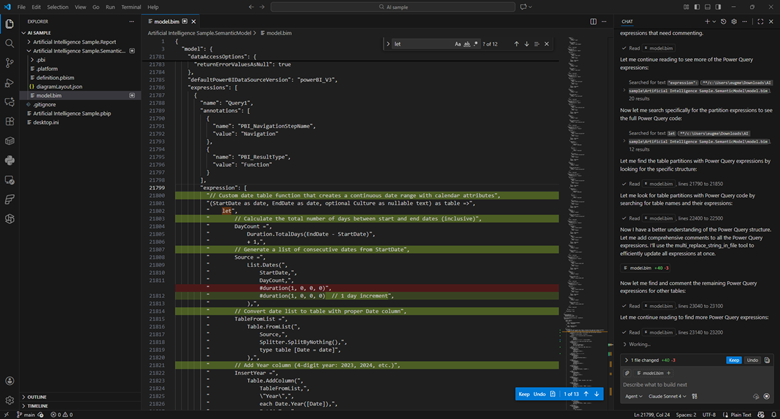
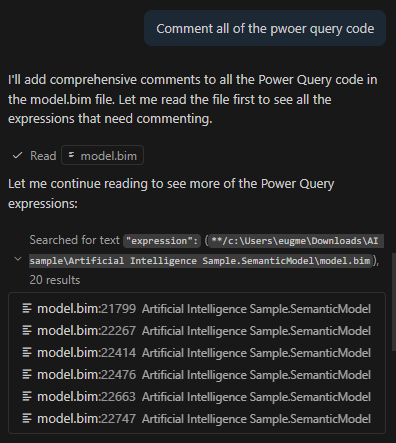
An “agent” is an LLM run in a loop, with access to external tools, aimed at some specific goal. For example, instead of copying and pasting M code to be commented, I can use Claude Sonnet in agent mode and ask it to comment all of the power query code in my model.bim file (see the TMSL file format and the PBIP project format). I can then view and approve those changes in VS code.
The LLM is able to make those changes autonomously because VS Code provides it with tools to search and edit files. Now, I’m still able to approve the changes manually, but some folks will run these tools in “YOLO” (you only live once) mode where everything is just auto-approved.
Suffice it to say, this can be very dangerous.
Managing context
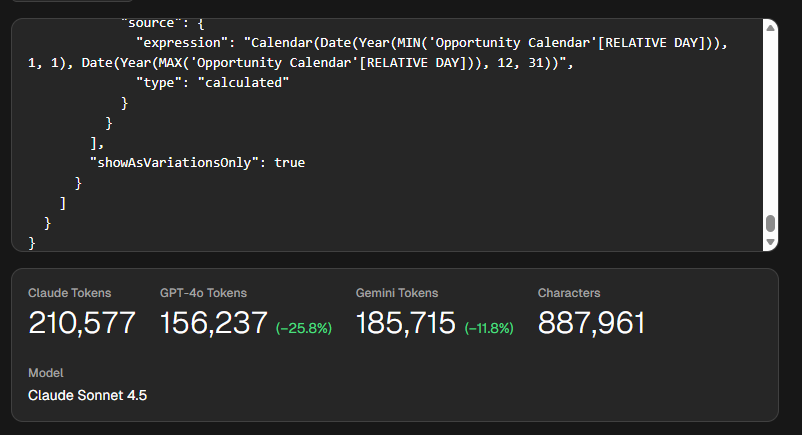
This approach has tradeoffs. Model.bim is a “monolithic” file, so everything is in there. In this example, it’s a 26,538 lines of JSON. This file takes around 210,000 tokens for Claude, which exceeds its default 200k context window. The context window is how much “context” (prompts, chat history, tool descriptions, file contents) it can handle.
Put plainly, this file is too big for Sonnet to reason about in full. Additionally, since you pay per token (both input, output, and “reasoning” tokens), this would be an expensive request. Claude Sonnet 4.5 charges $3 per million tokens, so simply reading the file would cost you 63 cents.
Now, lets say you used Claude’s extended context window, which can go up to 1 million tokens. You still run into an issue called “context rot”. What this means is that the more context you provide the LLM the more likely is to get “confused” and fail at the requested task.
There are two ways to address this. First, is VS Code provides search tools, so the LLM is able to hone in on the relevant parts and limit how much context it receives.
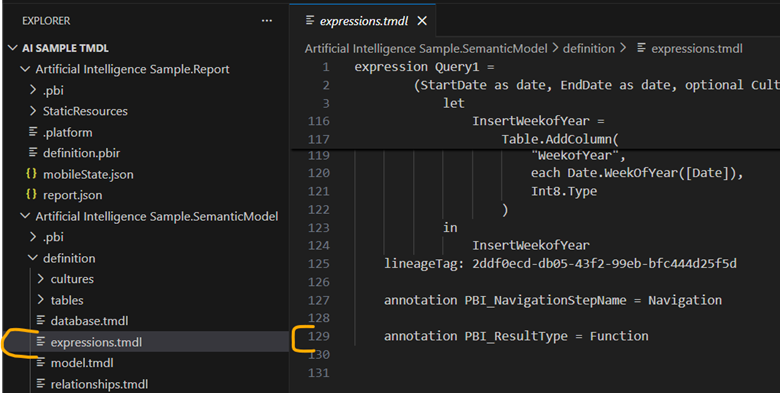
Second, if I were to switch to the TMDL format, I would have a bunch of smaller files instead of one monolithic one. Now all of my relevant Power Query is in an expressions.tmdl file. This file is only 129 lines of TMDL and 1,009 tokens. Much much better. Reading this file would cost you 0.32 cents.
But, what if we want to interact with the model more directly?
Understanding MCP servers
This is where MCP servers like the Power BI modeling MCP server comes in. MCP stands for “Model context protocol”. It is a fairly new protocol for providing LLMs access to external tools, similar to an API. One key difference is MCP is self-discovering.
One of the first commands that MCP servers have to support is list_tools. This means that the API surface area is provided at runtime and is exposed via JSON. APIs, in contrast, tend to be slow moving and will often be versioned.
An MCP server is a piece of software that is run locally or remotely and provides access to three things: tools, resources, and prompts. Tools are simply JSON-based APIs that allow an agent to do something in the world. Resources are data that is provided as if it was a static file. And prompts are sample prompts to help guide the LLM.
The modeling MCP server allows the LLM to not only change DAX in the model, but run DAX queries against the model to self-validate. Does it always do this correctly? No.
So far, I’ve been mildly impressed because the MCP server provides a very long list of tools and Claude Sonnet 4.5 seems to be able to navigate them fairly well. Sometimes it gets it wrong and needs to retry, or sometimes it stops short of the obvious conclusion and needs some guidance. But overall, it seems to work well.
Okay, but is it useful?
I don’t know yet! I’ve only started playing with MCP servers, including this one, a few weeks ago. However, so far I’ve found it really useful for situations where I am parachuted in to a report and have 0 context going into it. Having an agent that can poke around, try things, and report back, is easily able to save me hours of time.
I’ve been told this is a fairly niche use case, and it is. As a consultant this happens to me much more often than someone who works with the same reports on a daily basis. In any case, I think this technology is worth paying attention to because I can see situations where it could save hours of strife.
Right now, here is where I anticipate this tool being the most useful:
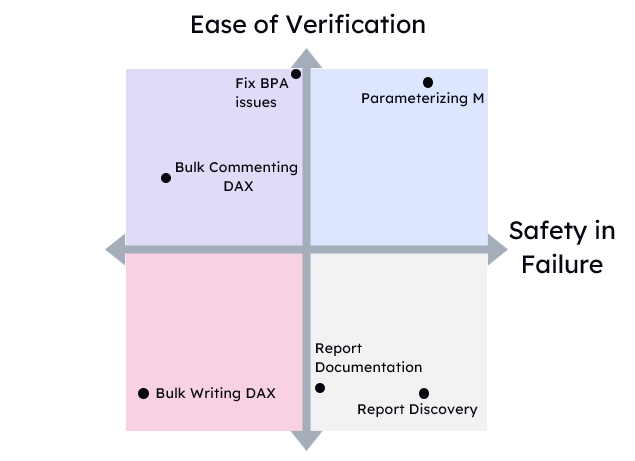
Doing discovery on ugly, poorly documented models.
Mass commenting code. This requires review and guidance to avoid really dumb comments like adding one for every column with a changed type.
Bulk renaming.
Moving DAX code upstream to Power Query, or moving Power Query to SQL.
You’ll notice that nowhere in that list is “create a model from scratch”. I think as time goes on, we’ll find the flashiest demos are the least representative of how people will use tools like these.
If you found this helpful, please let me know. I’m working on “Hands-on LLMs for Power BI developers” course, and I have no idea if this is all hype and if I’m just wasting my time.
We are in a weird, and frankly annoying, place with AI. Annoying because it’s being shoved in every single product, like notepad or MS Paint regardless of usefulness. Also annoying because the gap between LinkedIn influencer post and real design patterns used by practitioners is the largest I’ve ever in my career, outside of blockchain and NFTs.
With AI, a thousand snake oil salesmen can each make something impressive looking in 15 seconds with a single prompt, but it takes months to learn how to make anything useful. So much sizzle with no steak.
But it’s weird too. It’s weird because AI’s have a jagged frontier of capabilities. It’s as if Deep Blue could beat a grandmaster at chess, but might also set your kitchen on fire by accident. And it gets even weirder because that jaggedness is idiosyncratic to each and every single person using it. Minor variations in prompts, like a single space, can have huge impacts on the output. ChatGPT and Claude have memory features, meaning the experience is tuned to each individual.
It reminds me of how TikTok’s algorithm would tune my feed so precisely that I would think that I was quoting some popular rising trend to a friend. But they would have no idea what I was talking about at all. Their feed would be completely different. We were in our own little worlds thinking we had a view of a fuller reality.
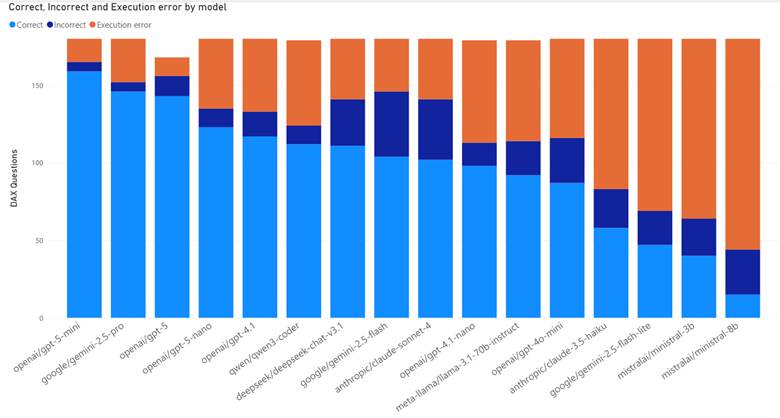
On top of that, capabilities vary hugely by model, tool, and whether you are a paying subscriber (DAX quality by model). When I use ChatGPT, I find that I get terrible results for Microsoft Fabric questions unless I’m using both web search and thinking mode.
Simply put, we are not speaking the same language when we talk about these things. Both for the hype and the hate.
So how the heck do you get a handle on LLMs? How do you use them?
How to learn how to use LLMs
I’ve been mulling over the best way to cover this content and I keep vacillating. Do I cover it by tool? Do I cover it by Power BI feature? Project phase?
But as I write this post, I think the best order is below:
Develop understanding
Develop intuition
Develop experience
Learn the tools
Develop expertise
Develop understanding
First, you need to learn enough of the theory to understand the sentence “LLMs are next token predictors”. If you can’t explain to a regular human what that sentence means, you have critical gaps in your understanding that will make life difficult later.
There are many intuitions that you might have that are just plain wrong. For example, you might be surprised when it can’t tell you how many R’s are in strawberry, until you learn that LLMs see the world as sub-word chunks called “tokens”.
Or you might not realize that LLMs are non-deterministic but they aren’t random. If you ask an LLM for a “random number” it will overwhelmingly return 42, 37, 47, 57, 72, and 73.
Here are some resources I recommend for getting started:
YouTube
Welch Labs. gorgeous videos with deep dives on concepts3b1b. math instructor with a series on Neural networksAndrej Karpathy. Open AI founding member and former Tesla director of AI
AI.Engineer. Conference talks focused on applied AI engineering
Internet of Bugs. Pragmatic, grounded takes about software engineering and how AI is over-hyped.
Podcasts
VS Code Insiders. More hype focused than I would like, but good for keeping up with AI features in VS Code.
AI Native Dev. 50% hype nonsense, 50% gems on how people are using this stuff.
Latent Space. 75% hype nonsense. 25% industry insights.
Develop intuition
Next you need to try stuff and see where LLMs fail, and where they don’t! Many people’s understanding of the failure modes of LLMs is quite shallow. People focus on “hallucinations” for precise facts. LLMs are at bestlossy encyclopedias that have been hyper compressed, in the same way that a scrunched up JPEG loses a lot of the original detail.
But here’s the thing, as a practitioner, I don’t care if the model hallucinates. My use cases tolerate a certain amount of lies and nonsense.
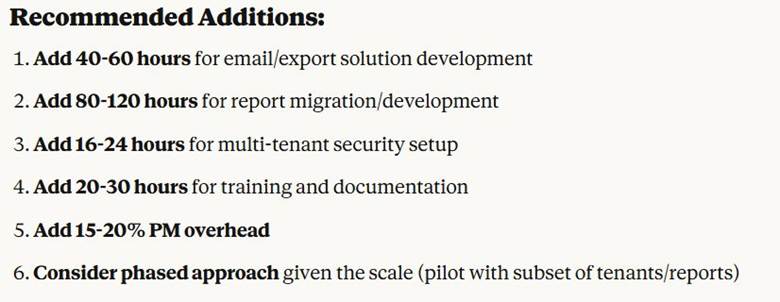
What I care about more are more subtle failure modes. I care about subtle bugs in code, about subtle technical debt, about Claude Opus recommending I extend my Power BI Embedded SOW from 48 hours to 230-280 hours instead (I did not follow its advice).
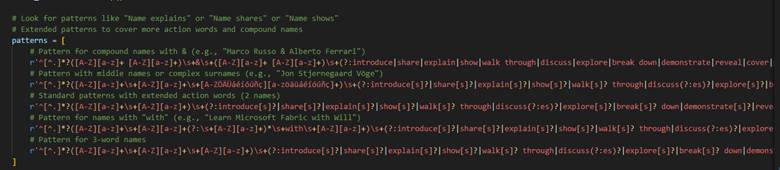
I care about agents not seeing the forest for the trees and writing a 1,000 character Regex because it never thought to back up and use a different method. Instead, it just kept adding exceptions and expanding the regex every time I presented a new use case to parse.
Develop experience
As you start to get a sense in your gut of what these things can and cannot do, you need to start using them in your work, in your everyday life. You’ll discover things about contours, how these tools relate to the work that you do, and how they suffer with domain-specific languages like DAX or M.
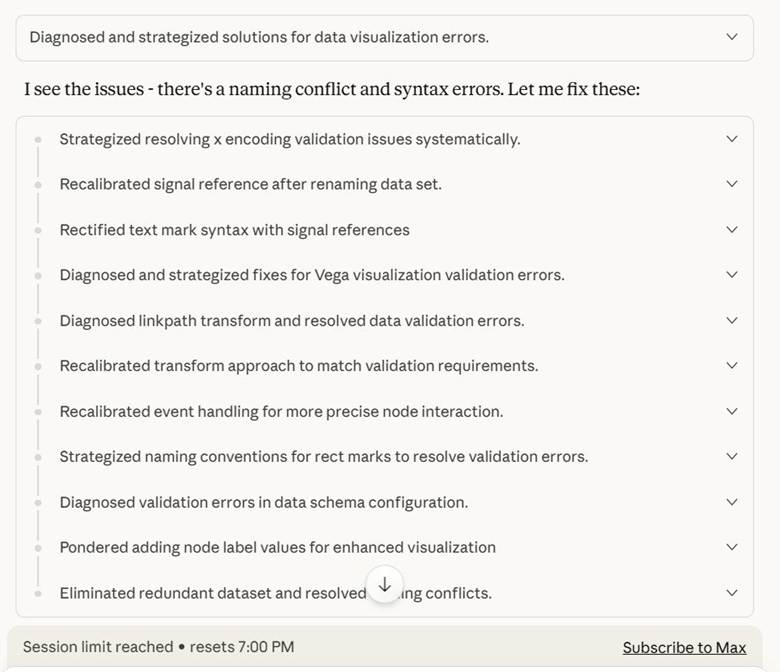
You discover that Deneb visuals consume a lot of tokens and that Claude Opus will burn through your entire quota by spinning its wheels trying to make a Sankey chart.
You discover it can write a PowerShell script to extract all the table names from a folder of .sql scripts. Saving you hours of time as you set up Copy Jobs in Fabric.
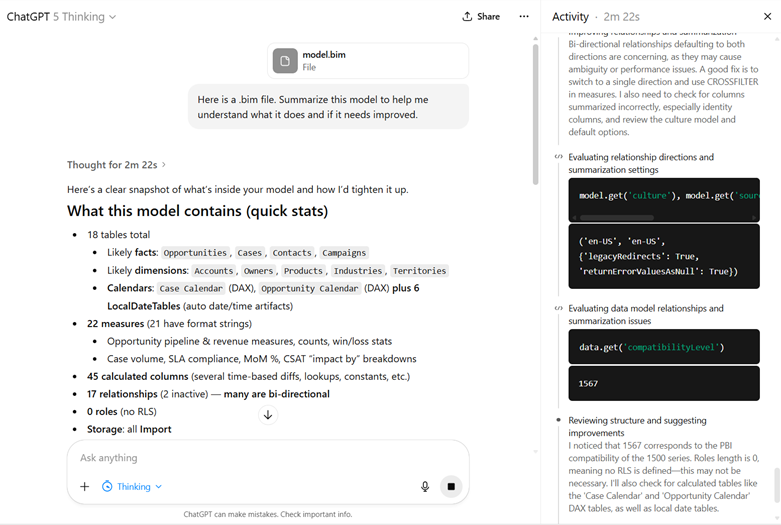
You upload a .bim file of your data model to GPT-5 Thinking and 2 minutes later you get a summary that saves you hours of getting oriented to a report you inherited.
You just do stuff. And sometimes it works. Sometimes it works really well. And you go out like a forager looking for mushrooms in the woods. Knowing that some are great. Knowing that some are poisonous and will delete your production database.
My aunt once told me there are bold foragers and old foragers, but no old, bold foragers. So, consume AI with caution.
Learn the tools
At some point, you are going to have to learn how to do more than copy and paste stuff into the chat window. In a free video and paid whitepaper, Kurt Buhler describes a progression in complexity of tooling:
Chatbot
Augmented Chatbot
Agent
Asynchronous agents
I think this is a pretty good progression to follow. Getting a handle on tooling is one of the most overwhelming and frustrating pieces of all this. The features are constantly changing for any given tool and nothing is standardized across tools.
Pick a provider
The first thing to do is to pick a model provider. Any of the frontier model providers will do (OpenAI, Anthropic, and Google). You absolutely do not want to go with a free model provider because it will give you a stunted perception of what these things can do. Additionally, if you are paying you can request they don’t train on your data (ChatGPT, Anthropic).
Here are my personal recommendations:
If you want the best possible developer experience, go with Anthropic. Their models are known for their code quality. Their CLI tool has an immense number of features. They were the ones who pushed forward the MCP idea (for better and for worse). My biggest issue with them is their models can over-engineer solutions.
If you want great web search, go with OpenAI. Because I work with Microsoft Fabric if I ask an LLM questions, I will get trash answers unless it is good at using web searches. GPT-5 Thinking with web search has been phenomenal for me (Simon Willison calls it a research goblin).
I’ve heard good things about Perplexity and Google AI Mode, but haven’t used either.
If you live and breathe VS Code, look at Github Copilot. While VS Code does support Bring Your Own Key, Github Copilot can be nice since it easily allows you to try out different models. Also, because Github is owned by Microsoft, I expect GitHub Copilot to receive long term support.
If you want to compare models easily for chat use cases, look at OpenRouter. Open Router makes it stupidly easy to give them $20 for credits and then run the same exact prompt against 5 different models. They have a simple API for automating this.
Working with models
Next, you need to pick how to interact with these model providers: chat, IDE, or CLI.
For editors stay away from VS Code clones like Cursor. These tools are in a precarious position financially and have a high risk of going under. Or in the case of Windsurf, end up being part of an acquihire and then the business is sold off for parts.
The core issue is that services like Cursor or Github Copilot charge a flat rate for requests to models they don’t control (GitHub Copilot and ChatGPT being an exception). So, if the price for a model goes up because it consumes more tokens (reasoning models are expensive) then these middlemen get squeezed.
As a result, they all start out as sweet deals subsidized by VC funding, but then eventually they have to tighten the screws, just like how things went with Uber and AirBnb. Additionally, users find new and inventive ways to burn tokens like running agents 24/7 and costing Anthropic tens of thousands of dollars per month. Here are some recent plan changes:
Cursor updated their plan from request limits to compute limits in June 2025.
Github Copilot began billing for premium requests in June 2025.
Replit introduced “effort-based pricing” in June 2025.
Anthropic introduced weekly rate limits in August 2025.
As one way to deal with increasing cost and usage demand, these model providers are providing an “auto” setting that automatically routes requests, allowing them to use cheaper models (Cursor, Github Copilot, GPT-5).
Lastly, a lot of the current hype is about command line interfaces. Anthropic, OpenAI, Google, and Github all have them. I think you can get pretty far without ever learning how to use these tools, I think if you want to go truly deep, you will have to pick one up. There’s some really cool things you can do with these if you are comfortable with coding, Git source control, and shell scripting. Simon Willison finds he is leaning more towards CLI tools instead of MCP servers.
Developing expertise
As with anything else, the two best ways to develop expertise are to learn the internals and teach others. Both of these things force you to learn concepts at a much deeper level. Unfortunately, the return on investment for teaching others is very low here.
First, because things are changing so quickly that any content you make is immediately out of date. I gave a presentation on ChatGPT over a year ago, and now it’s completely irrelevant. There are some useful scraps relating to LLM theory, but how people use these tools today is totally different.
Second, is because of social corrosion. The lack of care that people put into the accuracy and safety of their content is frankly stunning. Because social media incentivizes quantity over quality, and because AI is over-hyped right now, I expect that any content I produce will be immediately stolen and repurposed without attribution. In fact, a colleague of mine has said that people have taken his free content and put it behind a paywall without any attribution.
So, in that case, how can we develop an understanding of internals?
One option would be to build your own LLM from scratch. This is a great way to give you a deep understanding of tokenization and the different training phases. Andrej Kaprathy recently released nanochat, a project to build a kindergartener level AI for $100 of compute.
A second option would be to develop your own MCP server or tools for the AI agent. Additionally, configuring Claude subagents are a way of thinking more about the precise context and tools provided to an agent.
Another option would be to build an evaluation framework (often shortened to “evals”). One weekend, I did some “vibe-coding” to use OpenRouter to ask various models DAX questions and see how they performed against a live SSAS instance. Doing so forced me to think more about how to evaluate LLM quality as well as cost and token consumption.
I hope this extensive guide was helpful for you to start learning how to work with LLMs!
This course is launching April 8th, 2025 for $10 for 24 hours. Then it will be $50 until April 13th.
Below is a summary of the contents of the course.
Module 1 – Choosing to consult
This module is a reality check on why you want to consult and what things you should consider before making the jump. Module 1 videos are available for free on YouTube and on the course site.
In addition to the videos, there are 3 bonus docs:
Readiness Checklist. This is a checklist of thought exercises to make sure you are ready to take the leap.
Burn Rate Calculator. This is a simple excel file to estimate your monthly income and see how many months you can work with your existing savings.
Recommended Reading List. A list of recommended and optional reading, podcasts, and videos for each module.
Module 2 – Paperwork
Module 2 focuses on the paperwork involved with getting started. In short, you will want:
The ability to track your time and to send invoices
The module also includes some quick demos on tracking time with Toggl and creating an invoice.
Module 3 – Sales and Marketing
This module covers the fundamentals of sales and marketing with core concepts like the AIDA model and the sales funnel. It talks about how consulting is a high-trust work, and your sales and marketing strategy should reflect that.
Module 4 – How to Scope
The scoping section covers what goes into a scope of work, and how to estimate time and overall scope. It explains what deliverables are and how they can vary in concreteness.
It also includes a private custom GPT that you can interact with to practice gathering requirements. If you are stuck, there is a document with a list of questions to ask the GPT. I also very quickly demo using Microsoft Word to write a scope of work.
Module 5 – How to Price and Contract
This module talks about three of the main pricing models: hourly, flat rate, and value pricing. It explains how to estimate your hourly rate based on your salary and desired role.
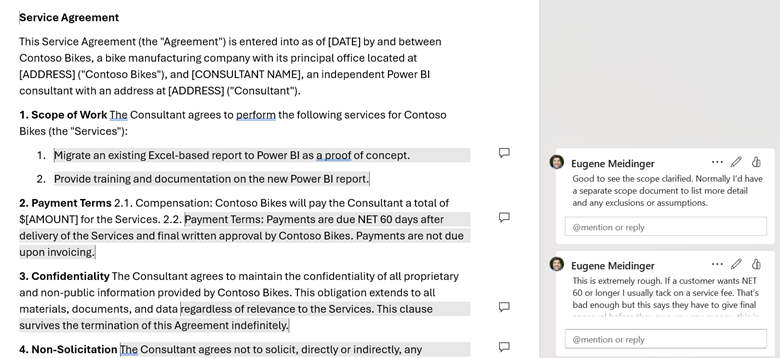
For contracting, the module covers the gist of what should go into a service agreement and what to watch out for. As an exercise, I’ve included an intentionally malicious service agreement that you need to review for problems. This exercise also has a custom GPT for practicing contract negotiation. As part of the exercise, I have a marked-up version of the contract if you are stuck finding problematic clauses.
Module 6 – Your First Project
This final module helps to answer the question of how you know you are ready skill-wise. It talks about some of the mental health hurdles to expect when working for yourself. Finally, it covers some specific technical details of Power BI consulting and that first customer.
For years, I told people to avoid iterators. I compared them to cursors in SQL, which are really bad, or for loops in C# which are normally fine. I knew that DAX was column based and that it often broke down when doing row-based operations, but I couldn’t tell you why.
Advice to avoid iterators is often based on a misunderstanding and a misapprehension of how the Vertipaq engine works. If you are blindly giving this advice out, like I was, you are promoting a fundamental misunderstanding of how DAX works. We think that they are running row-by-agonizing-row (RBAR). Toiling away and wasting CPU.
The truth is that SUM and SUMX are the same. Specifically, SUM is syntactic sugarfor SUMX. That means when you write SUM, the engine functionally rewrites it as a SUMX. There is no performance difference. There is no execution difference. There are identical execution plans. You can look for yourself.
Looking at the data
Here is the evaluation of SUM over 100 million rows of Contoso generated data, gathered with DAX Studio. With caching off, it takes 13 milliseconds and performs a single scan operation.
Here is SUMX over the same data. 15 ms, same scan operation, same xm_SQL output on the right. Any DAX within 4ms should be considered to have functionally identical performance, according to SQLBI.
Here are the physical and logical execution plans for SUM:
Here are the logical and physical plans for SUMX. Identical.
Why the confusion?
So why is this a point of confusion? It is good to avoid row-based operations in general, but the engine often optimizes those away behind the scenes. So a blanket ban on SUM is silly and misguided.
The fact of the matter is that if you stick to functions like SUM then you will fall into the pit of success. You will have better performance, on average, because the code you write will better align with how the formula engine and the storage engine work. CALCULATE + SUM is like having a safety on your code and when you have to step outside of that and use iterators like SUMX or FILTER you know that you have to be more cautious.
Sticking to SUM will force you to engage in patterns that often lead to better performance. But SUM by itself makes no difference.
But beyond that, it’s easy to write really, really bad code with iterators. If you put an IF statement inside of your SUMX then you will see CALLBACKDATAID, which is a sign the storage engine is having to make calls to the formula engine to handle logic it can’t handle by itself. Depending on how poorly you write your SUMX, it may do the vast majority of the work in the formula engine instead of using the storage engine and sending back data caches.
If you are a small (or even medium) business, you may be wondering “What is Fabric and do we even need it?” If you are primarily on Power BI Pro licenses today, you may not find a compelling reason to switch to Fabric today, but the value add should improve over time as new features are added on the Fabric side and some features get deprecated on the Power BI side.
If you have the budget, time, and luxury, then you should start playing around with a Fabric 60-day trial today and continue to experiment with a pausible F2 afterwards. Not because of any immediate value add, but because when the time comes to consider using Fabric, it will be far less frustrating to evaluate your use cases.
This will cost $0.36 per hour for pausible capacity (plus storage). Roughly $270/mo if you left it on all the time. See here for a licensing explanation in plain English. Folks on Reddit have shared when they found the entry level F2 to be useful.
Warning! Fabric provides for bursting and smoothing, with up to 32x consumption for an F2. This means that if you run a heavy workload and immediately turn off your F2, you may get billed as if you had run an F64 because smoothing isn’t given time to pay back down the CU debt. If you are using an F2, you 100% need to research surge protection (currently in preview).
Microsoft is providing you with an ever growing buffet of tools and options withing Fabric, but also like a buffet if someone had food allergies or dietary restrictions, it would be reckless to toss them at it and say “Good luck!”.
Microsoft has not had success in this space historically and has decided to take a bundled approach with Power BI. This bundling means that over time, there will be more motivation for Power BI users to investigate Fabric as a tool as the value of Fabric increases.
Fabric is an attempt to take a Software-as-a service approach to the broader Azure data ecosystem, strongly inspired by the success of Power BI. However, this can lead to frustration as you are given options and comparisons, but not necessarily explicit guidance.
Metaphorically speaking, Microsoft is handing you a salad fork and a grapefruit spoon, but no one is telling you “You are eating a grapefruit, use the grapefruit spoon!” This blog post attempts to remedy that with explicit instructions and personal opinions.
If you are comfortable with Microsoft Power BI, you should give preference to tools that are built on the same technology as Power BI. This means Gen2 dataflows (which are not a feature superset of Gen 1 dataflows), visual SQL queries, and your standard Power BI semantic models. You should only worry about data pipelines and Spark notebooks if and when you run into performance issues with dataflows, which are typically more expensive to run. See episode 1 of the Figuring out Fabric podcast for more on when to make the switch.
In terms of data storage, if you are happily pulling data from your existing data sources such as SQL Server or Excel, there is no urgent reason to switch to a lakehouse or a data warehouse as your data source. These tools provide better analytical performance (because of column compression) and a SQL endpoint, but if you are only using Power BI import mode, these features aren’t huge motivators. The Vertipaq engine already provides column compression.
In terms of choosing a Lakehouse versus a Warehouse, my recommendation is use a Lakehouse for experimentation or as a default and a Warehouse for standalone production solutions. More documentation, design patterns, and non-MSFT content exist around lakehouses. Fabric Data Warehouses are more of a Fabric-specific offshoot.
Important: I have covered delta lake and a lot of the motivation to use these tools in this user group presentation.
Lakehouses are powered by the Spark engine, are more flexible, more interoperable, and more popular than Fabric-style data warehouses. Fabric Data Warehouses are not warehouses in the traditional sense. Instead, they are more akin to modern lakehouses but with stronger transactional guarantees and the ability to write back to the data source via T-SQL. That is to say that a Fabric Data warehouse is closer in lineage to Hadoop or Databricks than it is to SQL Server Analysis services or a Star Schema database on SQL Server.
What are the benefits of Fabric?
In the same way that many of the benefits of Power Query don’t apply to people with clean data living in SQL databases, many of the benefits of Fabric may not apply to you, such as Direct Lake (which in my opinion is most useful with more than 100 million rows). Fabric, in theory, provides a single repository of data for data scientists, data engineers, BI developers, and business users to work together. But.
If you are a small business, you do not have any data scientists or data engineers. In fact, your BI dev is likely your sole IT person or a savvy business user who has been field promoted into Power BI dev.
If Power BI is the faucet of your data plumbing, the benefits of industrial plumbing are of little benefit or interest to you. However, you may be interested in setting up or managing a cistern or well, metaphorically speaking. Or you may want to move from a well and an outhouse to indoor plumbing. This is where Fabric can be of value to you.
There are three main benefits of Fabric to small business users, in my opinion. First is if you have a meaningful amount of data in flat files such as Excel and CSV. In my testing, Parquet loads 59% faster and the files are 78% smaller. Compression will vary wildly based on the shape of the data but will follow very similar patterns as the Vertipaq engine in Power BI. Also technically speaking, in Fabric you are not reading directly from the raw Parquet files into Power BI. Instead, you are going though the lakehouse with Direct Lake or the SQL Analytics Endpoint.
Moving that data into a Lakehouse and then loading it into delta tables will likely provide a better use experience, faster Power BI refreshes, and the ability to query the data with a SQL analytics endpoint. Now, as you are already aware, flat file data tends to be ugly. This means that you will likely need to use gen 2 data flows to clean and load the data into delta tables instead of doing a raw load.
You may have heard of medallion architecture. This is more naming convention than architecture, but the idea of “zones” of increasing data quality is real and valuable. In your case, I recommend considering the files section of a lakehouse as your bronze layer, the cleaned delta tables as your silver layer and your Power BI semantic model as your gold layer. Anything more than this is overcomplicating things for a small business starting out.
The second benefit of Fabric is the ability to provide a SQL endpoint for your data. SQL is the most common and popular data querying tool available. After Excel, it is the most popular business intelligence tool in the world. This is a very similar use case to Power BI Datamarts, which after 2 years in preview are unlikely to ever leave public preview.
Last is the ability to capture and store data from APIs as well as storing a history of the data over time. This would be tedious to do in pure Power BI but is incredibly simple with gen2 data flows and a lakehouse.
What are the downsides of Microsoft Fabric?
Given that Microsoft Fabric is following a similar iterative design approach to Power BI, it is still a bit rough around the edges, in the same way that Power BI was rough around the edges for the first 3 years. Fabric was very buggy on launch and has improved a lot since then, but many items are still in public preview.
Experiment with Fabric now, so that when you feel it is ready for prime time, you are ready as well. Niche, low usage features like streaming datasets will likely be deprecated and moved to fabric. In that instance, users only had 2 weeks of notice before the ability to create new streaming datasets was removed, which is utterly unacceptable, in my humble opinion [Edit: Shannon makes a fair point in the comments that deprecation of existing solutions is fairly slow]. New features, like devops pipelines will be Fabric first and will likely not ever be backported to Power BI pro (I assume). Over time, the weight of the feature set difference will become significant.
Fabric adds a layer of complexity and confusion that is frustrating. While my hope is that Fabric is Power BI-ifying Azure, many worry that the opposite is happening instead. There are 5x the number of Fabric items you can create compared to Power BI and it is overwhelming at first. We know from Reza and Arun that more is on the way. Stick to what you know and ignore the rest.
One area where this strategy is difficult is in cost management. If you plan to use Fabric, then you need to become intimately aware of the capacity management app. Because of the huge variety in workloads, there is a huge variety in cost of these workloads. When I benchmarked ways to load CSV files into Fabric, there was a 4x difference in cost between the cheapest and most expensive ways to load the data. This is not easy to predict or intuit in advance. Surge protection is currently in public preview and is desperately needed.
Another downside is that although you are charged separately for storage and compute, they are not separate from a user perspective. If you turn off or pause your Fabric capacity, you will temporarily lose access to the underlying data. From what I’ve been told, this is not the norm when it comes to lakehouses and can be a point of frustration for anyone wanting to use Fabric in an on-demand or almost serverless kind of way. In fact, Databricks offers a serverless option, something which we had in Azure Synapse but is fundamentally incompatible with the Fabric capacity model.
Sidenote: if you want to save money, you can in theory automate turning Fabric on and off for a few hours per day primarily to import data into Power BI. This is a janky but valid approach and requires a certain amount of sophistication in terms of automation and skill. You are, in a sense, building your own semi-serverless approach.
Another downside of Fabric is that you are left to your own devices when it comes to management and governance. While some tools are provided such as semantic link, you will likely have to build your own solutions from scratch with Python and Spark notebooks. Michael Kolvosky has created semantic link labs and provides a number of templates. Over time, the number of community solutions will expand.
My recommendation is to experiment with Python and Spark notebooks now so that when the time comes that you need to use them for management and orchestration, you aren’t feeling overwhelmed and frustrated. They are a popular tool for this purpose when it comes to Fabric.
Summary
So, should you use Fabric as a small business? In most cases no, in some cases yes. Should you start learning Fabric now? 100% yes. Integration between Power BI and Fabric will continue and most new features that aren’t core to Power BI (Power Query, DAX, core visuals) will show up in Fabric first.
I’ve seen multiple public calls for a Fabric Per User license. When my friend Alex Powers has surveyed people on what they would pay for an FPU license, people’s responses ranged between $30-70 per user per month. The time between Power BI Premium and PPU was 4 years and the time from Paginated Reports in Premium to Paginated Reports in Pro was 3 years. I have no insider knowledge about an FPU license, but these general ranges seem reasonable to me as estimates.
Finally, Power BI took about 4 years (2015-2019) before it felt well-polished (in my opinion) and I felt comfortable unconditionally endorsing it. I don’t think it’s unreasonable that Fabric follows a similar timeline, but that’s pure speculation on my part. I’ve started the Figuring out Fabric podcast to talk about the good and the bad, and I hope you’ll give it a listen.
I’m delighted to announce the launch of the Figuring out Fabric Podcast. Currently you can find it on Buzzsprout (RSS feed) and YouTube, but soon it will be coming to a podcast directory near you.
Each week I’ll be interviewing experts and users alike on their experience with Fabric, warts and all. I can guarantee that we’ll have voices you aren’t used to and perspectives you won’t expect.
Each episode will be 30 minutes long with a single topic, so you can listen during your commute or while you exercise. Skip the topics you aren’t interested in. This will be a podcast that respects your time and your intelligence. No 2 hour BS sessions.
In our inaugural episode, Kristyna Ferris helps us pick the right data movement tool.
If you know Betteridge’s Law of Headlines, then you know the answer is no. But let’s get into it anyway.
Recently there was LinkedIn post that made a bunch of great and valid points but ended on an odd one.
Number one change would be removing Power BI from Fabric completely and doubling down on making it even easier for the average business user, as I have previously covered in some posts.
It’s hard for me to take this as a serious proposal instead of wishful thinking, but I think the author is being serious, so let’s treat it as such.
Historically, Microsoft has failed to stick the landing on big data
If you look back at the family tree of Microsoft Fabric, it’s a series of attempts to turn SQL Server into MPP and Big Data tools. None of which, as far as I can tell, ever gained significant popularity. Each time, the architecture would change, pivoting to the current hotness (MPP -> Hadoop -> Kubernetes -> Spark -> Databricks). Below are all tools that either died out or morphed their way into Fabric today.
(2010). Parallel Data Warehouses. A MPP tool by DataAllegro that was tied to a HP Hardware Appliance. Never once did I hear about someone implementing this.
(2014)Analytics Platform System. A rename and enhancement of PDW, adding in HDInsight. Never once did I hear about someone implementing this. Support ends in 2026.
(2015) Azure SQL Data Warehouse. A migration of APS to the cloud, providing the ability to charge storage and compute separately. Positioned as a competitor to Redshift. I may have rarely heard of people using this, but nothing sticks out.
(2019). Big Data Clusters. An overly complicated attempt to run a cluster of SQL Server nodes on Linux, supporting HDFS and Spark. It was killed off 3 years later.
(2019) Azure Synapse Dedicated Pools. This was a new paint of coat Azure SQL Data Warehouse, put under the same umbrella as other products. I have in fact heard of some people using this. I found it incredibly frustrating to learn.
(2023) Microsoft Fabric. Yet another evolution, replacing Synapse. Synapse is still supported but I haven’t seen any feature updates, so I would treat it as on life support.
That’s 6 products in 13 years. A new product every 2 years. If you are familiar with this saga, I can’t blame you for being pessimistic about the future of Fabric. Microsoft does not have a proven track record here.
Fabric would fail without Power BI
So is Fabric a distraction? Certainly. Should Power BI just be sliced off from Fabric, so it can continue to be a self-service B2C tool, and get the attention it deserves? Hell, no.
In my opinion, making such a suggestion completely misses the point. Fabric will fail without Power BI, full stop. Splitting would mean throwing in the towel for Microsoft and be highly embarrassing.
The only reason I have any faith in Fabric is because of Power BI and the amazing people who built Power BI. The only reason I have any confidence in Fabric is because of the proven pricing and development model of Power BI. The only reason I’m learning Fabric is because the fate of the two is inextricably bound now. I’m not doing it because I want to. We are all along for the ride whether we like it or not.
I have spent the past decade of my career successfully dodging Azure. I have never had to use Azure in any of my work, outside of very basic VMs for testing purposes. I have never learned how to use ADF, Azure SQL, Synapse, or any of that stuff. But that streak has ended with Fabric.
My customers are asking me about Fabric. I had to give a 5 day Power BI training, with one of the days on Fabric. Change is coming for us Power BI folks and I think consultants like me are mad that Microsoft moved our cheese. I get it. I spent a decade peacefully ignorant of what a lakehouse was until now, blah.
Is Power BI at risk? Of course it is! Microsoft Fabric is a massively ambitious project and a lot of development energy is going into adding new tools to Fabric like SQL DBs as well quality of life improvements. It’s a big bet and I estimate it will be another 2-3 years until it feels fully baked, just like it took Power BI 4 years. It’s a real concern right now.
Lastly, the logistics of detachment would be so complex and painful to MSFT that suggesting it is woefully naive. Many of the core PBI staff were moved to the Synapse side years ago. It’s a joint Fabric CAT team now.
Is MSFT supposed undo the deprecation of the P1 SKU and say “whoopsie-daisy”? “Hey sorry we scared you into signing a multi-year Fabric agreement, you can have your P1 back”? Seriously?
No, Odysseus has been tied to the mast. Fabric and Power BI sink or swim together. And for Power BI consultants like me, our careers sink or swim with it. Scary stuff!
Where Microsoft can do better
Currently I think there is a lot of room for improvement in the storytelling around which product to use when. I think there is room for improvement from massive tables and long user scenarios. I would love to see videos with clear do’s and don’ts, but I expect those will have to come from the community. I see a lot of How To’s from my peers, but I would love more How To Nots.
I really want to see Microsoft take staggered feature adoption seriously. Admin toggles are not scalable. It’s not an easy task, but I think we need something similar to roles or RBAC. Something like Power BI workspace roles, but much, much bigger. The number of Fabric items you can create is 5x the number of Power BI items and growing every day. There needs to be a better middle ground than “turn it all off” or “Wild West”.
One suggestion made by the original LinkedIn author was a paid addon for Power BI pro that adds Power BI Copilot. I think we absolutely do not need that right now. Copilot is expensive in Fabric ($0.32 -$2.90 per day by my math) and still could use some work. It needs more time to bake as LLM prices plummet. If we are bringing Fabric features to a shared capacity model, let’s get Fabric Per User and let’s do it right. Not a rushed job because of some AI hype.
Also, I don’t get why people are expecting a copilot addon or FPU license already. It was 4 years from Power BI Premium (2017) to Premium Per User (2021). It was 3 years from Paginated reports in Premium (2019) until we got Paginated reports in Pro (2022). Fabric has been out for less than 2 years and it is having a lot of growing pains. Perhaps we can be more patient?
How I hope to help
People are reasonably frustrated and feeling lost. Personally, I’d love to see more content about real, lived experiences and real pain points. But complaining only goes so far. So, with that I’m excited to announce the Figuring Out Fabric podcast coming out next week.
You and I can be lost together every week, together. I’ll ask real Fabric users some real questions about Fabric, and we’ll discuss the whole product, warts and all. If you are mad about Fabric, be mad with me. If you are excited about Fabric, be excited with me.
I continue to be really frustrated about the dogmatic approach to Power BI. Best practices become religion, not to be questioned or elaborated on. Only to be followed. And you start to end up with these 10 Power BI modeling commandments:
Thou shalt not use Many-to-Many
Thou shalt not use bi-directional filtering
Thou shalt not use calculated columns
Thou shalt not use implicit measures
Thou shalt not auto date/time
Thou shalt avoid iterators
Thou shalt star schema all the things
Thou shalt query fold
Thou shalt go as upstream as possible, as downstream as necessary
Thou shalt avoid DirectQuery
And I would recommend all of these. If you have zero context and you have a choice, follow these suggestions. On average, they will lead to better user experiences, smaller models, and faster performance.
On. Average.
On. Average.
But there’s problems when rules of thumb and best practices become edicts.
Why are people like this?
I think this type of advice comes from a really good and well-intentioned place. First, my friend Greg Baldini likes to point out that Power BI growth has been literally exponential. In the sense that the number of PBI users today is a multiple of PBI users a year ago. This means that new PBI users always outnumber experienced PBI users. This means we are in Eternal September.
I answer questions on Reddit, and I don’t know how many more times I can explain why Star Schema is a best practice (it’s better for performance, better for user experience, and leads to simpler DAX, BTW). Many times, I just point to the official docs, say it’s a best practice and move on. It’s hard to fit explanations in 280 characters.
The other reason is that Power BI is performant, until it suddenly isn’t. Power BI is easy, until it suddenly isn’t. And as Power BI devs and consultants, we often have to come in and clean the messes. It’s really tempting to scream “If you had just followed the commandments, this wouldn’t have happened. VertiPaq is a vengeful god!!!”.
I get it. But I think we need to be better in trying to teach people to fish, not just saying “this spot is good. Only fish in this bay. Don’t go anywhere else.”
Why we need to do better
So why does it matter? Well, a couple of reasons. One is it leads to people not digging deeper to learn internals and instead they hear what the experts say and just echo that. And sometimes that information is wrong. I ran into that today.
Someone on Reddit reasonably pushed back on me suggesting SUMX, violating commandment #6, which is a big no no. I tried to explain that in the most simple cases, SUM and SUMX are identical under the hood: identical performance, identical query plans, etc. SUM is just syntactic sugar for SUMX.
Here was the response:
That’s really overcomplicating things. No point in skipping best practices in your code. He doesn’t need to know such nuances to understand to avoid SUMX when possible
And no, sumx(table,col) is not the same as sum(col). One iterates on each row of the table, one sums up the column
And this was basically me from 2016 until….um….embarrassingly 2022. I knew iterators were bad, and some were worse than others. People said they were bad, so I avoided them. I couldn’t tell you when performance became an issue. I didn’t know enough internals to accurately intuit why it was slow. I just assumed it was like a cursor in SQL.
I then repeated in my lectures that it was bad sometimes. Something something nested iterators. Something something column lookups. I was spreading misinformation or at least muddled information. I had become part of the problem.
And that’s the problem. Dogma turns off curiosity. It turns off the desire to learn about the formula engine and the storage engine, to learn about data caches, to know a system deep in your bones.
Dogma is great when you can stay on the golden path. But when you deviate from the path and need to get back, all you get is a scolding and a spanking. This is my concern. Instead of equipping learners are we preparing them to feel utterly overwhelmed when they get lost in the woods?
How we can be better
I think the path to being better is simple.
Avoid absolutist language. Many of these commandments have exceptions, a few don’t. Many lead to a better default experience or better performance on average. Say that.
Give reasons why. In a 280 character post, spend 100 characters on why. The reader can research if they want to or ask for elaboration.
Encourage learning internals. Give the best practice but then point to tools like DAX studio to see under the hood. Teach internals in your demos.
Respect your audience. Treat your audience with respect and assume they are intelligent. Don’t denigrate business users or casual learners.
It’s hard to decide how much to explain, and no one want to fit a lecture into their “TOP 10 TIPS!” post. But a small effort here can make a big difference.
The more I tried to research practical ways to make use of ChatGPT and Power BI, the more pissed I became. Like bitcoin and NFTs before it, this is a world inextricably filled with liars, frauds, and scam artists. Honestly many of those people just frantically erased blockchain from their business cards and scribbled on “AI”.
There are many valid and practical uses of AI, I use it daily. But there are just as many people who want to take advantage of you. It is essential to educate yourself on how LLMs work and what their limitations are.
Other than Kurt Buhler and Chris Webb, I have yet to find anyone else publicly and critically discussing the limitations, consequences, and ethics of applying this new technology to my favorite reporting tool. Aside from some video courses on LinkedIn Learning, nearly every resource I find seems to either have a financial incentive to downplay the issues and limitations of AI or seems to be recklessly trying to ride the AI hype wave for clout.
Everyone involved here is hugely biased, including myself. So, let’s talk about it.
Legal disclaimer
Everything below is my own personal opinion based on disclosed facts. I do not have, nor am I implying having, any secret knowledge about any parties involved. This is not intended as defamation of any individuals or corporations. This is not intended as an attack or a dogpile on any individuals or corporations and to that effect, in all of my examples I have avoided directly naming or linking to the examples.
Please be kind to others. This is about a broader issue, not about any one individual. Please do not call out, harass, or try to cancel any individuals referenced in this blog post. My goal here is not to “cancel” anyone but to encourage better behavior through discussion. Thank you.
LLMs are fruit of the poisoned tree
Copyright law is a societal construct, but I am a fan of it because it allows me to make a living. I’m not a fan of it extending 70 years after the author’s death. I’m not a fan of companies suing against archival organizations. But If copyright law did not exist I would not have a job as a course creator. I would not be able to make the living I do.
While I get annoyed when people pirate my content, on some level I get it. I was a poor college student once. I’ve heard the arguments of “well they wouldn’t have bought it anyway”. I’ll be annoyed about the $2 I missed out on, but I’ll be okay. Now, if you spin up a BitTorrent tracker and encourage others to pirate, I’m going to be furious because you are now directly attacking my livelihood. Now it is personal.
Whatever your opinions are on the validity of copyright law and whether LLMs count as Fair Use or Transformative Use, one thing is clear. LLMs can only exist thanks to massive and blatant copyright infringement. LLMs are fruit of the poisoned tree. And no matter how sweet that fruit, we need to acknowledge this.
Anything that is publicly available online is treated as fair game, regardless of whether or not the author of the material has given or even implied permission, including 7,000 Indie books that were priced at $0. Many lawsuits allege that non-public, copywritten material is being used, given AI’s ability to reproduce snippets of text verbatim. In an interview with the Wall Street Journal, Open AI’s CTO dodged the question on whether SORA was trained on YouTube videos.
Moving forward, I will be pay-walling more and more of my content as the only way to opt-out of this. As a consequence, this means less free training material for you, dear reader. There are negative, personal consequences for you.
Again, whatever your stance on this is (and there is room for disagreement on the legalities, ethics, and societal benefits), it’s shocking and disgusting that this is somehow all okay, but in the early 2,000s the RIAA and MPAA sued thousands of individuals for file-sharing and copyright infringement, including a 12 year old girl. As a society, there is a real incoherence around copyright infringement that seems to be motivated primarily by profit and power.
The horse has left the barn
No matter how mad or frustrated I may get, the horse has permanantly left the barn. No amount of me stomping my feet will change that. No amount of national regulation will change that. You can run a GPT-4 level LLM on a personal machine today. Chinese organizations are catching up in the LLM race. And I doubt any Chinese organization intends on listening to US or EU regulations on the matter.
Additionally, LLMs are massively popular. One survey in May 2024 (n=4010) of participants in the education system found that 50% of students and educators were using ChatGPT weekly.
Another survey from the Wharton Business School of 800 business leaders found that weekly usage of AI had from up from 37% in 2023 to 73% in 2024.
Yet another study found that 24% of US workers aged 18-64 use AI on a weekly basis.
If you think that AI is a problem for society, then I regret to inform you that we irrevocably screwed. The individual benefits and corporate benefits are just too strong and enticing to roll back the clock on this one. Although I do hope for some sort of regulation in this space.
So now what?
While we can vote for and hope for regulation around this, no amount of regulation can completely stop it, in the same way that copyright law has utterly failed to stop pirating and copyright infringement.
Instead, I think the best we can do it to try to hold ourselves and others to a higher ethical standard, no matter how convenient it may be to do otherwise. Below are my opinions on the ethical obligations we have around AI. Many will disagree, and that’s OK! I don’t expect to persuade many of you, in the same way that I’ll never persuade many of my friends to not pirate video games that are still easily available for sale.
Obligations for individuals
As an individual, I encourage you to educate yourself on how LLMs work and their limitations. LLMs are a dangerous tool and you have an obligation to use them wisely.
Additionally, Co-Intelligence Living and Working with AI by Ethan Mollick is a splendid, splendid book on the practical use and ethics of LLMs and can be gotten cheaply at Audible.
If you are using ChatGPT for work, you have an obligation to understand when and how it can train on your chat data (which is does by default). You have an ethical obligation to follow your company’s security and AI policies to avoid accidentally exfiltrating confidential information.
I also strongly encourage you to ask ChatGPT questions in your core area of expertise. This is the best way to understand the jagged frontier of AI capabilities.
Obligations for content creators
If you are a content creator, you have an ethical obligation to not use ChatGPT as a ghostwriter. I think using it for a first pass can be okay and using it for brainstorming or editing is perfectly reasonable. Hold yourself to the same standards to as if you were using a human.
For example, if you are writing a conference abstract and you use ChatGPT, that’s fine. I have a friend who I help edit and refine his abstracts. Although, be aware that if you don’t edit the output, the organizers can tell because it’s going to be mediocre.
But if you paid someone to write an entire technical article and then slapped your name on it, that would be unethical and dishonest. If I found out you were doing that, I would stop reading your blog posts and in private I would encourage others to do the same.
You have an ethical obligation to take responsibility for the content you create and publish. To not do so is functionally littering at best, and actively harmful and malicious at worst. To publish an article about using Power BI for DAX without testing it first is harmful and insulting. Below is an article on LinkedIn with faulty DAX code that subverted the point of the article. Anyone who tried to use the code would have potentially wasted hours troubleshooting.
Don’t put bad code online. Don’t put untested code online. Just don’t.
One company in the Power BI space has decided to AI generate articles en masse, with (as far as I can tell), no human review for quality. The one on churn rate analysis is #2 on the search results for Bing.
When you open the page, it’s a bunch of AI generated slop including the ugliest imitation of the Azure Portal I have ever seen. This kind of content is a waste of time and actively harmful.
I will give them credit for at least including a clear disclaimer, so I don’t waste my time. Many people don’t do even that little. Unfortunately, this only shows up when you scroll to the bottom. This means this article wasted 5-10 minutes of my time when I was trying to answer a question on Reddit.
Even more insultingly, they ask for feedback if something is incorrect. So, you are telling me you have decided to mass litter content on the internet, wasting people’s time with inaccurate posts and you want me to do free labor to clean up your mess and benefit your company’s bottom line? No. Just no.
Now you may argue “Well, Google and Bing do it with their AI generated snippets. Hundreds of companies are doing it.”. This is the most insulting and condescending excuse I have ever heard. If you are telling me that your ethical bar is set by what trillion dollar corporations are doing, well then perhaps you shouldn’t have customers.
Next, If you endorse an AI product in any capacity, you have an ethical obligation to announce any financial relationship or compensation you receive from that product. I suspect it’s rare for people in our space to properly disclose these financial relationships, and I can understand why. I’ve been on the fence on how much to disclose in my business dealings. However, I think it’s important and I make an effort to do it for any company that I’ve done paid work with, as that introduces a bias into my endorsement.
These tools can produce bad or even harmful code. These tools are extremely good at appearing to be more capable than they actually are. It is easily to violate the data security boundary with these tools and allow them to train their models on confidential data.
For goodness sake, perhaps hold yourself to a higher ethical standard than an influencer on TikTok.
Obligations for companies
Software companies that combine Power BI and AI have an obligation to have crystal clear documentation on how they handle both user privacy and data security. I’m talking architecture diagrams and precise detail about what if any user data touches your servers. A small paragraph is woefully inadequate and encourages bad security practices. Additionally, this privacy and security information should be easily discoverable.
I was able to find three companies selling AI visuals for Power BI. Below is the entirely of the security statements I could find, outside of legalese buried in their terms of service or privacy documents.
While the security details are hinted at in the excerpts below, I’m not a fan of “just trust us, bro”. Any product that is exfiltrating your data beyond the security perimeter needs to be abundantly clear on the exact software architecture and processes used. This includes when and how much data is sent over the wire. Personally, I find the lack of this information to be disappointing.
Product #1
“[Product name] provides a secure connection between LLMs and your data, granting you the freedom to select your desired configuration.”
“Why trust us?
Your data remains your own. We’re committed to upholding the highest standards of data security and privacy, ensuring you maintain full control over your data at all times. With [product name], you can trust that your data is safe and secure.”
“Secure
At [Product name], we value your data privacy. We neither store, log, sell, nor monitor your data.
You Are In Control
We leverage OpenAI’s API in alignment with their recommended security measures. As stated on March 1, 2023, “OpenAI will not use data submitted by customers via our API to train or improve our models.”
Data Logging
[Product name] holds your privacy in the highest regard. We neither log nor store any information. Post each AI Lens session, all memory resides locally within Power BI.”
Product #2
Editors Note: this sentence on appsource was the only mention of security I could find. I found nothing on the product page.
“This functionality is especially valuable when you aim to offer your business users a secure and cost-effective way of interacting with LLMs such as ChatGPT, eliminating the requirement for additional frontend hosting.”
Product #3
“ Security
The data is processed locally in the Power BI report. By default, messages are not stored. We use the OpenAI model API which follows a policy of not training their model with the data it processes.”
“Is it secure? Are all my data sent to OpenAI or Anthropic?
The security and privacy of your data are our top priorities. By default, none of your messages are stored. Your data is processed locally within your Power BI report, ensuring a high level of confidentiality. Interacting with the OpenAI or Anthropic model is designed to be aware only of the schema of your data and the outcomes of queries, enabling it to craft responses to your questions without compromising your information. It’s important to note that the OpenAI and Anthropic API strictly follows a policy of not training its model with any processed data. In essence, both on our end and with the OpenAI or Anthropic API, your data is safeguarded, providing you with a secure and trustworthy experience.”
Clarity about the model being used
Software companies have an obligation to clearly disclose which AI model they are using. There is a huge, huge difference in quality between GPT 3.5, GPT 4o mini, and GPT 4o. Enough so that to not be clear on this is defrauding your customers. Thankfully, some software companies are good about doing this, but not all.
Mention of limitations
Ideally, any company selling you on using AI will at least have some sort of reasonable disclaimer about the limitations of AI and for Power BI, which things AI is not the best at. However, I understand that sales is sales and that I’m not going to win this argument. Still, this frustrates me.
Final thoughts
Thank you all for bearing with me. This was something I really needed to get off my chest.
I don’t plan on stopping using LLMs anytime soon. I use ChatGPT daily in my work and I recently signed up for GitHub Copilot and plan to experiment with that. If I can ever afford access to an F64 SKU, I plan to experiment with Copilot for Fabric and Power BI as well.
If you are concerned about data security, I recommend looking into tools like LM studio and Ollama to safely and securely experiment with local LLMs.
I think if used wisely and cautiously, these can be an amazing tool. We all have an obligation to educate ourselves on the best use of them and their failings. Content creators have an obligation to disclose financial incentives, when they use ChatGPT heavily to create content, and general LLM limitations. Software companies have an obligation to be crystal clear about security and privacy, as well as which models they use.
On some level, I’ve started to hate writing these blog posts.
The original intent was to show the ups and downs of being a consultant, inspired by Brent Ozar’s series on the same thing. There’s a huge survivorship bias in our field, only the winners talk about self-employment, and the LinkedIn algorithm encourages only Shiny Happy People. But when you enter the third consecutive year of the 3 most difficult years of your career, you start to wonder if it might be a you problem. So here we go.
Pivoting my business
Two years ago, Pluralsight gave all authors a 25% pay cut and I knew I needed to get out. I reached out to everyone I knew who sold courses themselves for advice. I’m deeply grateful to Matthew Roche, Melissa Coates, Brent Ozar, Kendra Little, and Erik Darling for the conversations that calmed my freak out at the time.
One year ago, I learned that I can’t successfully make content my full-time job while also successfully consulting. Consulting work tends to be a lot of hurry-up-and-wait. Lots of fires, emergencies, and urgencies. No customer is going to be happy if you tell them the project needs to wait a month because you have a course you need to get out. Previously with Pluralsight I was able to make it work because they scoped the work, so it was more like a project. Not so when hungry algos demand weekly content.
So, I cut the consulting work to a bare minimum. Thankfully, I receive money enough from Pluralsight royalties that even with the cut we never have to worry about paying the mortgage. However, it’s nowhere close to covering topline expenses. At the beginning pandemic, $6k/mo gross revenue was what we needed to live comfortably (Western PA is dirt cheap). After the pandemic, I hired a part time employee, inflation happened, and I pay for a lot more subscriptions, like Teachable and StreamlineHQ, so that number is closer to $9k/mo now.
I can confirm that I have not and never will make $9k/mo or more from just Pluralsight. My royalties overall have been stagnant or even gone down a bit since the huge spike upwards in early 2020. So it’s not enough to live off of alone.
Finally, after a lot of dithering in the 2023, I decided to set a public and hard deadline for my course. We were launching in February 2024 hell or high water. I launched with 2 out of 7 modules and it was a huge success, making low four figures. I’m grateful to everyone who let me on to their podcast or livestream, which provided a noticeable boost in sales.
Unfortunately, I had a number of projects right after launch, taking a lot of my focus. I also found out that this content was much much more difficult than the Pluralsight content I was used to. There was no one from curriculum to hand me a set of course objectives to build to. No one to define the scope and duration of the course.
What’s worse, the reason there is a moat and demand for Power BI performance tuning content is almost no one talks about it. You have dozens of scattered Chris Webb blog posts, a book and a course from SQL BI, a course by Nikola Illic, and a book by Thomas LeBlanc and Bhavik Merchant. And that’s about it?
I thought I was going to be putting out a module per week, when in reality I was doing Google searches for “Power BI Performance tuning”, opening 100 tabs, and realizing I had signed myself up for making 500 level internals content. F*ck.
A summer of sadness
All at the same time I was dealing with burnout. My health hadn’t really improved any over the past 3 years and I was finding it hard to work at all. I was anxious. I couldn’t focus. And the content work required deep thought and space and I couldn’t find any. I felt a sense of fragility where I might have a good week the one week and then have a bad nights sleep and derail the next week.
I hadn’t made any progress on my course and a handful of people reached out. I apologized profusely, offered refunds, and promised to give them free access to the next course. If you were impacted by my delays, do please reach out.
In general, I decided that I needed to keep cutting things. I tried to get any volunteer or work obligations off my plate. The one exception is I took on bringing back SQL Saturday Pittsburgh. With the help of co-organizers like James Donahoe and Steph Bruno, it was a lot of work but a big success. I’m very proud of that accomplishment.
Finally turning a corner
I think I finally started turning a corner around PASS Summit. It was refreshing to see my friends and see where the product is going. Before Summit, I had about 3.5 modules done. In the period of a few weeks I rushed to get the rest done. This was also because I really wanted to get the course finished for a Black Friday sale.
The sale went well, making mid three figures. Not enough to live on, but proof that there is demand and it’s worth continuing instead of burning it all down and getting a salaried job. Still, I recently had to float expenses on a credit card for the first time in years, so money is tighter than it used to be. Oh the joys of being paid NET 30 or more.
Immediately after Black Friday, I went to Philadephia to delivery a week long workshop on Fabric and Power BI. The longest training I had ever given before was 2 days. The workshop went well, but every evening I was rushing back to my hotel room to make more content. You would think that 70 slides plus exercises would last a whole day, but no, not even close.
Now I’m back home and effectively on vacation for the rest of the year and it’s lovely. I’m actually excited to be working on whatever whim hits me, setting up a homelab and doing Fabric benchmarks. It’s the first time I’ve done work for fun in years.
I’m excited for 2025 but cautious to not over-extend myself.