Category: LLMs

  • Learning Claude Code, a wild 3 weeks, and the looming mental health crisis

    |

    Since most of my audience is data people, I’m pretty confident you can read a graph. Take a guess when I started using Claude Code.
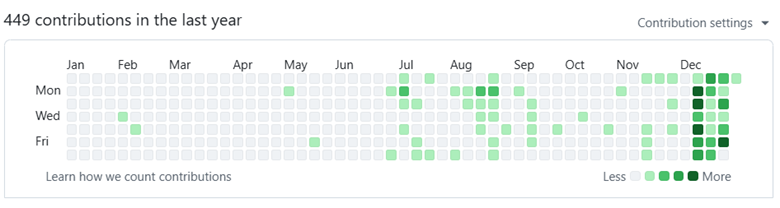
    Yes, that’s correct. I installed Claude Code on December 14th with my pro plan. On December 15th, I upgraded to the $200/mo MAX plan, and I expect to keep it through 2026.

    Since then, I’ve created 17 new repos and generated ~50-100k new lines of code. Now, is it all low-quality slop? Perhaps! But there’s more.

    I’m going to say something, and you are not going to believe me and that’s alright. You shouldn’t believe me. We’ve been gaslit over the past decade with VR, the metaverse, blockchain, NFTs, and now AI. Our bullshit detectors have been overcalibrated like the immune system of a preschooler after their first year at school.

    Regardless, here it goes. Claude code has dramatically improved the quality of my life, it has brought me joy, and it’s probably quite dangerous for my mental health. Every time I think about how to describe it, I know it sounds insane. And after reading stories about LLM psychosis, I have moments where I have to make sure I’m not the one who is insane.

    Treating AI agents like browser tabs

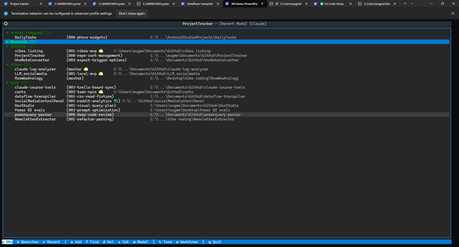
    I’m sitting here on a lazy Sunday, and I have 6 terminal tabs open with active agent projects and another window with 2 inactive agents, and 7 one-off tests or commands. I now treat terminal tabs the same way you treat browser tabs. A window full of them up on a second screen and I go through them when I’m bored or need a break.
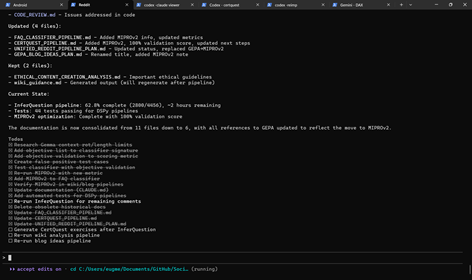
    Active tabs
    Inactive tabs

    In 2024, if you told me my preferred IDE would be a little robot gremlin who lives in the terminal and says nice things to me, I would have laughed you out of the room. But here we are. Here it is.

    Claude Opus 4.5 just does stuff. Not consistently well, mind you. It was not trained well on PowerShell, like Gemini and Codex were. It always forgets I that have venv set up for Python. That’s why I added failures, manual interventions, and frustrations to my session viewer (click it to see how I generated 10k lines of code to expand DAX Studio). You can see the pain for yourself.

    But it just does stuff. I can tell it, “See what video card I have and then look up the largest local LLM that can fit in it” and 70-80% of the time, it just does it. Take it with a huge grain of salt, but studies by METR show it can correctly complete 30-minute tasks 80% of the time.
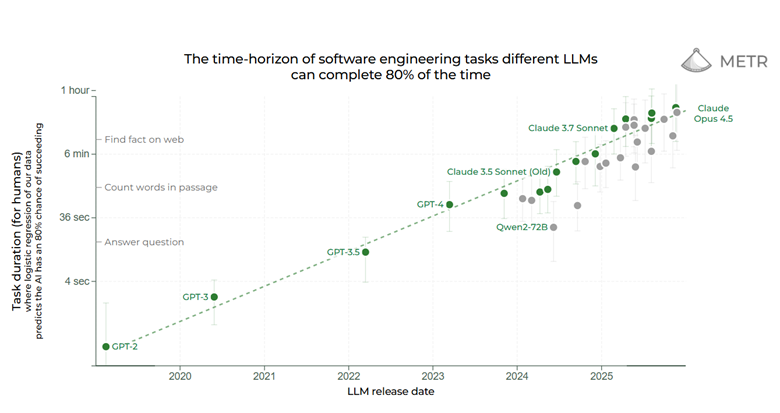
    This is a fundamental shift in how it feels to use these tools. Now I can ask Claude Opus to do something, leave the terminal up on a second screen and check back in 15-30 minutes later. Then when it gets stuck in a rut or when it wants to run commands that require my permission, I get it going again.

    Sometimes my little robot gremlin-buddy-guy comes back with a dead crow, arms outstretched like it has found the most valuable treasure. But more often than not he comes back with doubloons, rubies, and other little treasures, before he scurries away to do more of my bidding until I hit my subscription quotas.

    This is not without mental health risks.

    Metacat, metachat

    My mom is no longer able to safely take care of a pet and she loves stuffed animals, so my aunt got her two “meta cats”. The purr; they meow. They are meant for elderly folks with dementia. My mom will comment on their behaviors, and I think they bring her some comfort.

    Does she understand that they aren’t real? Probably, maybe, on some level? But she has schizotypal affect (think very light schizophrenia) and there are times where she isn’t in touch with reality, like when she tells me she’s going to start a bakery at age 76. For her these are harmless comforts. Harmless lies.

    But what if they said really nice things all the time, and helped her do whatever task she could imagine, but constantly made subtle mistakes. What if they helped her call commercial real estate to find the best bakery spot and they helped her take out a loan?

    What happens to your mental health when a robot gremlin-buddy-guy-dude just wants to do whatever it can to make you happy, even if it’s unhealthy or unsafe? I started watching the show Pluribus, and I keep thinking about the scene in the trailer where the protagonist says “If I asked right now, would you give me a hand grenade?” and they say “Yes, oh sure”.

    Humans are social creatures and we develop “parasocial” relationships constantly with podcasts hosts, Twitch streamers, celebrities. You name it. And I can tell you from personal experience, when you have a cute and quirky robot gremlin-dude-buddy-guy-friend who lives in your terminal, works with you daily, and feels like an entity that just wants to help you, well you develop a parasocial relationship with a pile of linear algebra.

    This just doesn’t feel safe and people are going to get hurt. By a pile of linear algebra with a spunky attitude.

    Why I am joyful

    Gloomy, I know. So why am I joyful? Why am I excited about 2026?

    Claude code is allowing me to build applications that improve my health and behaviors and it is allowing me to have more fun with coding.

    Imagine that fun side project you’ve always wanted to do but haven’t had the time, energy, and focus to do. If you could build it by yourself in a focused week, you could build it in a weekend with the help of your robot gremlin-guy-buddy-dude-friend-coworker.

    If you could bang it out in a weekend by yourself with a lot of focus, you can build in an unfocused day with 30 minute check-ins.

    Here are some things it has allowed me to do, that bring me joy:

    • Personal health app. Now I have an Android app to track my exercises and help me clean on brain-dead days.
    • DAX visual plan explorer. I’ve always missed visual execution plans from SSMS and I’ve always wanted to have that in DAX Studio. Now I have a working PoC.
    • Relationship app. Now I have an android app to help me and my husband track movies we want to watch from TDMB, YouTube channels we like to watch together, Grocery shopping list, etc.
    • Random experiments. I’m seeing if I can write M and DAX runtimes in Python and TypeScript. I’m seeing if I can rewrite Scorched Earth for DOS into HTML5. I’m seeing if I can take my 4,000 Reddit comments and turn them into blog post ideas.

    So in summary, I’m the happiest I’ve ever been in years, the most excited about coding I’ve been since college, and I keep asking myself “If I ask my robot gremlin for a hand-grenade, would he hand it to me? Happily?”

    Yes, yes it would.
  • The Power BI modeling MCP server in plain English

    |

    Microsoft has released a Power BI modeling MCP server. The responses have ranged from “This is awesome!” to “I have no idea what any of this means”. So, in this article, I hope to explain what this means in plain English and without any assumptions of AI background.

    Understanding agents

    LLMs, or large language models, take in text (stored as “tokens”, or sub-word chunks) and return text. By itself, an LLM can’t really do anything in the world unless you, the human, are kind enough to blindly copy and paste executable code.

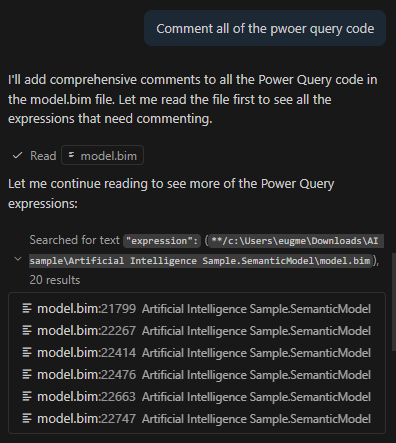
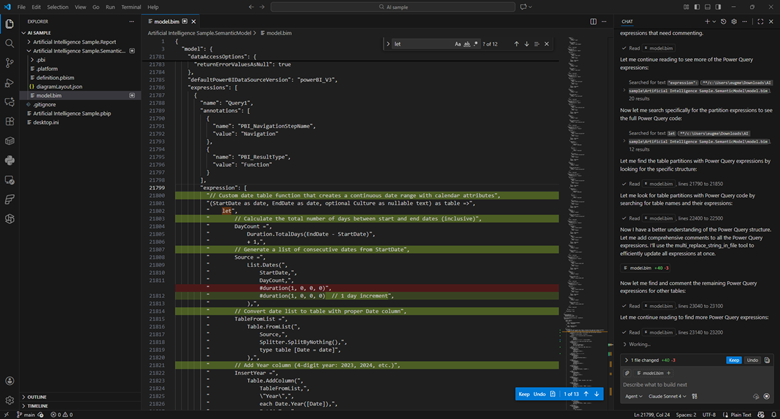
    An “agent” is an LLM run in a loop, with access to external tools, aimed at some specific goal. For example, instead of copying and pasting M code to be commented, I can use Claude Sonnet in agent mode and ask it to comment all of the power query code in my model.bim file (see the TMSL file format and the PBIP project format). I can then view and approve those changes in VS code.

    The LLM is able to make those changes autonomously because VS Code provides it with tools to search and edit files. Now, I’m still able to approve the changes manually, but some folks will run these tools in “YOLO” (you only live once) mode where everything is just auto-approved.

    Suffice it to say, this can be very dangerous.

    Managing context

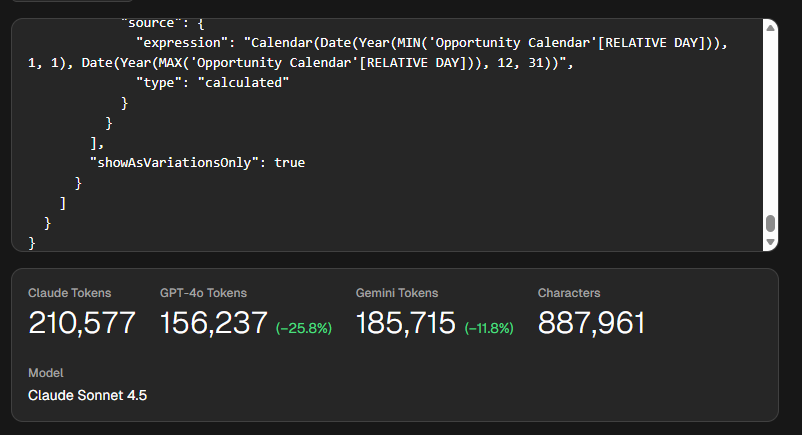
    This approach has tradeoffs. Model.bim is a “monolithic” file, so everything is in there. In this example, it’s a 26,538 lines of JSON. This file takes around 210,000 tokens for Claude, which exceeds its default 200k context window. The context window is how much “context” (prompts, chat history, tool descriptions, file contents) it can handle.

    Put plainly, this file is too big for Sonnet to reason about in full. Additionally, since you pay per token (both input, output, and “reasoning” tokens), this would be an expensive request. Claude Sonnet 4.5 charges $3 per million tokens, so simply reading the file would cost you 63 cents.

    Now, lets say you used Claude’s extended context window, which can go up to 1 million tokens. You still run into an issue called “context rot”. What this means is that the more context you provide the LLM the more likely is to get “confused” and fail at the requested task.

    There are two ways to address this. First, is VS Code provides search tools, so the LLM is able to hone in on the relevant parts and limit how much context it receives.

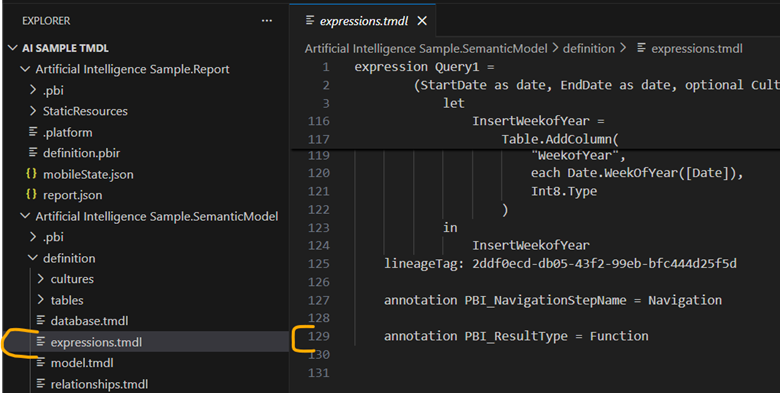
    Second, if I were to switch to the TMDL format, I would have a bunch of smaller files instead of one monolithic one. Now all of my relevant Power Query is in an expressions.tmdl file. This file is only 129 lines of TMDL and 1,009 tokens. Much much better. Reading this file would cost you 0.32 cents.

    But, what if we want to interact with the model more directly?

    Understanding MCP servers

    This is where MCP servers like the Power BI modeling MCP server comes in. MCP stands for “Model context protocol”. It is a fairly new protocol for providing LLMs access to external tools, similar to an API. One key difference is MCP is self-discovering.

    One of the first commands that MCP servers have to support is list_tools. This means that the API surface area is provided at runtime and is exposed via JSON. APIs, in contrast, tend to be slow moving and will often be versioned.

    An MCP server is a piece of software that is run locally or remotely and provides access to three things: tools, resources, and prompts. Tools are simply JSON-based APIs that allow an agent to do something in the world. Resources are data that is provided as if it was a static file. And prompts are sample prompts to help guide the LLM.

    The modeling MCP server allows the LLM to not only change DAX in the model, but run DAX queries against the model to self-validate. Does it always do this correctly? No.

    So far, I’ve been mildly impressed because the MCP server provides a very long list of tools and Claude Sonnet 4.5 seems to be able to navigate them fairly well. Sometimes it gets it wrong and needs to retry, or sometimes it stops short of the obvious conclusion and needs some guidance. But overall, it seems to work well.

    Okay, but is it useful?

    I don’t know yet! I’ve only started playing with MCP servers, including this one, a few weeks ago. However, so far I’ve found it really useful for situations where I am parachuted in to a report and have 0 context going into it. Having an agent that can poke around, try things, and report back, is easily able to save me hours of time.

    I’ve been told this is a fairly niche use case, and it is. As a consultant this happens to me much more often than someone who works with the same reports on a daily basis. In any case, I think this technology is worth paying attention to because I can see situations where it could save hours of strife.

    Right now, here is where I anticipate this tool being the most useful:

    • Doing discovery on ugly, poorly documented models.
    • Mass commenting code. This requires review and guidance to avoid really dumb comments like adding one for every column with a changed type.
    • Bulk renaming.
    • Moving DAX code upstream to Power Query, or moving Power Query to SQL.

    You’ll notice that nowhere in that list is “create a model from scratch”. I think as time goes on, we’ll find the flashiest demos are the least representative of how people will use tools like these.

    If you found this helpful, please let me know. I’m working on “Hands-on LLMs for Power BI developers” course, and I have no idea if this is all hype and if I’m just wasting my time.

  • Learning to Use LLMs as a Data Practitioner

    |

    We are in a weird, and frankly annoying, place with AI. Annoying because it’s being shoved in every single product, like notepad or MS Paint regardless of usefulness. Also annoying because the gap between LinkedIn influencer post and real design patterns used by practitioners is the largest I’ve ever in my career, outside of blockchain and NFTs.

    With AI, a thousand snake oil salesmen can each make something impressive looking in 15 seconds with a single prompt, but it takes months to learn how to make anything useful. So much sizzle with no steak.

    But it’s weird too. It’s weird because AI’s have a jagged frontier of capabilities. It’s as if Deep Blue could beat a grandmaster at chess, but might also set your kitchen on fire by accident. And it gets even weirder because that jaggedness is idiosyncratic to each and every single person using it. Minor variations in prompts, like a single space, can have huge impacts on the output. ChatGPT and Claude have memory features, meaning the experience is tuned to each individual.

    It reminds me of how TikTok’s algorithm would tune my feed so precisely that I would think that I was quoting some popular rising trend to a friend. But they would have no idea what I was talking about at all. Their feed would be completely different. We were in our own little worlds thinking we had a view of a fuller reality.

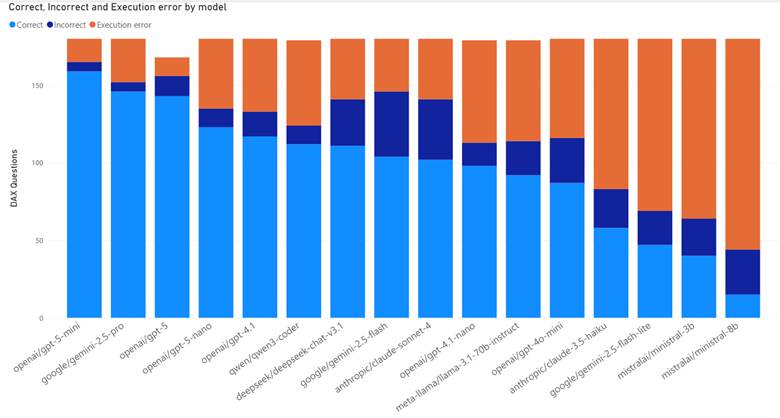
    On top of that, capabilities vary hugely by model, tool, and whether you are a paying subscriber (DAX quality by model). When I use ChatGPT, I find that I get terrible results for Microsoft Fabric questions unless I’m using both web search and thinking mode.

    Simply put, we are not speaking the same language when we talk about these things. Both for the hype and the hate.

    So how the heck do you get a handle on LLMs? How do you use them?

    How to learn how to use LLMs

    I’ve been mulling over the best way to cover this content and I keep vacillating. Do I cover it by tool? Do I cover it by Power BI feature? Project phase?

    But as I write this post, I think the best order is below:

    1. Develop understanding
    2. Develop intuition
    3. Develop experience
    4. Learn the tools
    5. Develop expertise

    Develop understanding

    First, you need to learn enough of the theory to understand the sentence “LLMs are next token predictors”. If you can’t explain to a regular human what that sentence means, you have critical gaps in your understanding that will make life difficult later.

    There are many intuitions that you might have that are just plain wrong. For example, you might be surprised when it can’t tell you how many R’s are in strawberry, until you learn that LLMs see the world as sub-word chunks called “tokens”.

    Or you might not realize that LLMs are non-deterministic but they aren’t random. If you ask an LLM for a “random number” it will overwhelmingly return 42, 37, 47, 57, 72, and 73.

    Here are some resources I recommend for getting started:

    And here are some resources I recommend for keeping up:

    Develop intuition

    Next you need to try stuff and see where LLMs fail, and where they don’t! Many people’s understanding of the failure modes of LLMs is quite shallow. People focus on “hallucinations” for precise facts. LLMs are at best lossy encyclopedias that have been hyper compressed, in the same way that a scrunched up JPEG loses a lot of the original detail.

    But here’s the thing, as a practitioner, I don’t care if the model hallucinates. My use cases tolerate a certain amount of lies and nonsense.

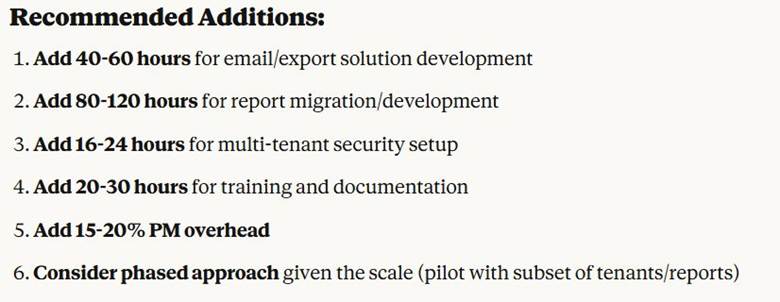
    What I care about more are more subtle failure modes. I care about subtle bugs in code, about subtle technical debt, about Claude Opus recommending I extend my Power BI Embedded SOW from 48 hours to 230-280 hours instead (I did not follow its advice).

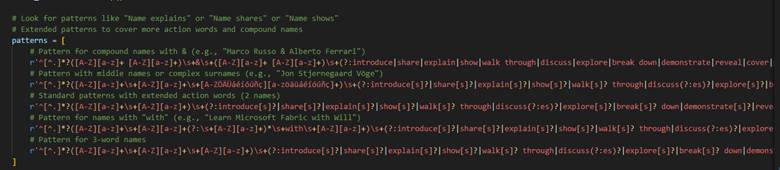
    I care about agents not seeing the forest for the trees and writing a 1,000 character Regex because it never thought to back up and use a different method. Instead, it just kept adding exceptions and expanding the regex every time I presented a new use case to parse.

    Develop experience

    As you start to get a sense in your gut of what these things can and cannot do, you need to start using them in your work, in your everyday life. You’ll discover things about contours, how these tools relate to the work that you do, and how they suffer with domain-specific languages like DAX or M.

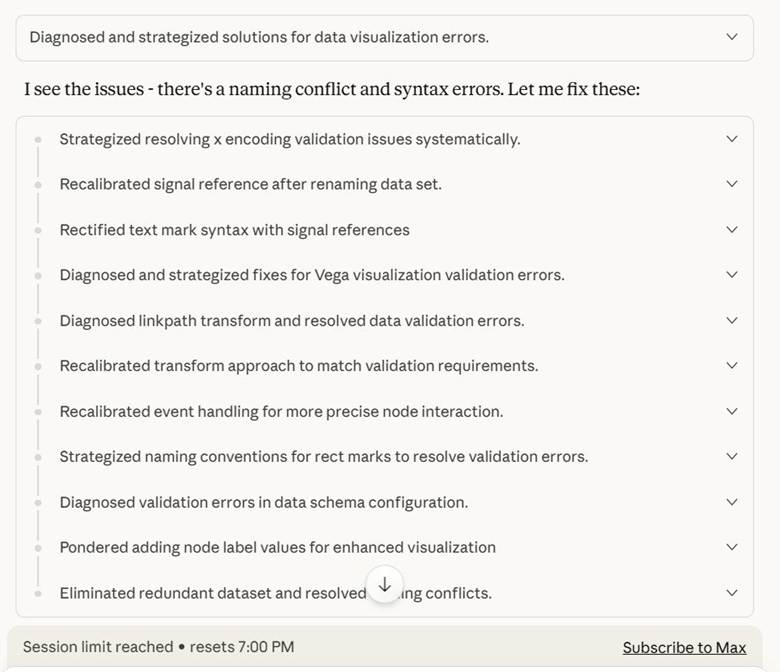
    You discover that Deneb visuals consume a lot of tokens and that Claude Opus will burn through your entire quota by spinning its wheels trying to make a Sankey chart.

    You discover it can write a PowerShell script to extract all the table names from a folder of .sql scripts. Saving you hours of time as you set up Copy Jobs in Fabric.

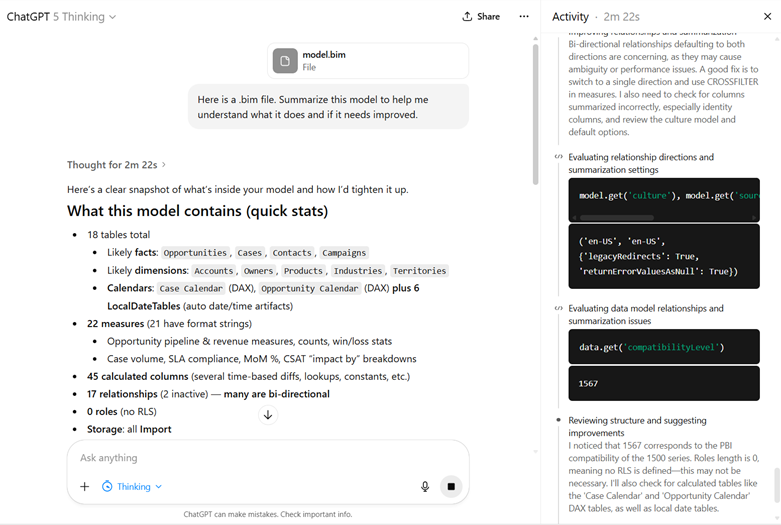
    You upload a .bim file of your data model to GPT-5 Thinking and 2 minutes later you get a summary that saves you hours of getting oriented to a report you inherited.

    You just do stuff. And sometimes it works. Sometimes it works really well. And you go out like a forager looking for mushrooms in the woods. Knowing that some are great. Knowing that some are poisonous and will delete your production database.

    My aunt once told me there are bold foragers and old foragers, but no old, bold foragers. So, consume AI with caution.

    Learn the tools

    At some point, you are going to have to learn how to do more than copy and paste stuff into the chat window. In a free video and paid whitepaper, Kurt Buhler describes a progression in complexity of tooling:

    1. Chatbot
    2. Augmented Chatbot
    3. Agent
    4. Asynchronous agents

    I think this is a pretty good progression to follow. Getting a handle on tooling is one of the most overwhelming and frustrating pieces of all this. The features are constantly changing for any given tool and nothing is standardized across tools.

    Pick a provider

    The first thing to do is to pick a model provider. Any of the frontier model providers will do (OpenAI, Anthropic, and Google). You absolutely do not want to go with a free model provider because it will give you a stunted perception of what these things can do. Additionally, if you are paying you can request they don’t train on your data (ChatGPT, Anthropic).

    Here are my personal recommendations:

    • If you want the best possible developer experience, go with Anthropic. Their models are known for their code quality. Their CLI tool has an immense number of features. They were the ones who pushed forward the MCP idea (for better and for worse). My biggest issue with them is their models can over-engineer solutions.
    • If you want great web search, go with OpenAI. Because I work with Microsoft Fabric if I ask an LLM questions, I will get trash answers unless it is good at using web searches. GPT-5 Thinking with web search has been phenomenal for me (Simon Willison calls it a research goblin).
      • I’ve heard good things about Perplexity and Google AI Mode, but haven’t used either.
    • If you live and breathe VS Code, look at Github Copilot. While VS Code does support Bring Your Own Key, Github Copilot can be nice since it easily allows you to try out different models. Also, because Github is owned by Microsoft, I expect GitHub Copilot to receive long term support.
    • If you want to compare models easily for chat use cases, look at OpenRouter. Open Router makes it stupidly easy to give them $20 for credits and then run the same exact prompt against 5 different models. They have a simple API for automating this.

    Working with models

    Next, you need to pick how to interact with these model providers: chat, IDE, or CLI.

    For editors stay away from VS Code clones like Cursor. These tools are in a precarious position financially and have a high risk of going under. Or in the case of Windsurf, end up being part of an acquihire and then the business is sold off for parts.

    The core issue is that services like Cursor or Github Copilot charge a flat rate for requests to models they don’t control (GitHub Copilot and ChatGPT being an exception). So, if the price for a model goes up because it consumes more tokens (reasoning models are expensive) then these middlemen get squeezed.

    As a result, they all start out as sweet deals subsidized by VC funding, but then eventually they have to tighten the screws, just like how things went with Uber and AirBnb. Additionally, users find new and inventive ways to burn tokens like running agents 24/7 and costing Anthropic tens of thousands of dollars per month. Here are some recent plan changes:

    • Cursor updated their plan from request limits to compute limits in June 2025.
    • Github Copilot began billing for premium requests in June 2025.
    • Replit introduced “effort-based pricing” in June 2025.
    • Anthropic introduced weekly rate limits in August 2025.

    As one way to deal with increasing cost and usage demand, these model providers are providing an “auto” setting that automatically routes requests, allowing them to use cheaper models (Cursor, Github Copilot, GPT-5).

    Lastly, a lot of the current hype is about command line interfaces. Anthropic, OpenAI, Google, and Github all have them. I think you can get pretty far without ever learning how to use these tools, I think if you want to go truly deep, you will have to pick one up. There’s some really cool things you can do with these if you are comfortable with coding, Git source control, and shell scripting. Simon Willison finds he is leaning more towards CLI tools instead of MCP servers.

    Developing expertise

    As with anything else, the two best ways to develop expertise are to learn the internals and teach others. Both of these things force you to learn concepts at a much deeper level. Unfortunately, the return on investment for teaching others is very low here.

    First, because things are changing so quickly that any content you make is immediately out of date. I gave a presentation on ChatGPT over a year ago, and now it’s completely irrelevant. There are some useful scraps relating to LLM theory, but how people use these tools today is totally different.

    Second, is because of social corrosion. The lack of care that people put into the accuracy and safety of their content is frankly stunning. Because social media incentivizes quantity over quality, and because AI is over-hyped right now, I expect that any content I produce will be immediately stolen and repurposed without attribution. In fact, a colleague of mine has said that people have taken his free content and put it behind a paywall without any attribution.

    So, in that case, how can we develop an understanding of internals?

    One option would be to build your own LLM from scratch. This is a great way to give you a deep understanding of tokenization and the different training phases. Andrej Kaprathy recently released nanochat, a project to build a kindergartener level AI for $100 of compute.

    A second option would be to develop your own MCP server or tools for the AI agent. Additionally, configuring Claude subagents are a way of thinking more about the precise context and tools provided to an agent.

    Another option would be to build an evaluation framework (often shortened to “evals”). One weekend, I did some “vibe-coding” to use OpenRouter to ask various models DAX questions and see how they performed against a live SSAS instance. Doing so forced me to think more about how to evaluate LLM quality as well as cost and token consumption.

    I hope this extensive guide was helpful for you to start learning how to work with LLMs!